UPDATE April 16, 2024
Two weeks in and I’ve now published an updated sheet that accurately calculates earnings under the new Ambassador Program (AP) method that went into effect on Zazzle April 1, 2025.
Here are two examples of real-world earnings reports run through the calculator:
Example 1
Example 2

The percents I’ve shown in ( ) in my screenshots are the percent of total order that the net earnings actually equal.
So using Example 2, you can see that the set royalty rate was 28%. $17.15 x 28% = $4.80.
But it’s showing they only earned $2.64, 15.4% of the $17.15.
That’s because the net of $2.64 shown is after the ERF and MRF fees have been deducted.
Hopefully the new reports being promised will include columns to show the fees so that people aren’t pulling their hair out wondering why the royalty shown as earned is so much less than the subtotal shown x the royalty % shown.
If a “self-promoted” sale, you can see that the net referral amount earned + the net royalty earned does equal the advertised goal of 40% of total order. (A little less due to the Excess Royalty Fee deduction.)
This particular example happened to be a coffee mug published under the main Wedding category. Weddings are in the 50% bracket but mugs as product type are in Home & Living, the 40% bracket. So this answered a very important question for me: Which category rate is applied? The actual product type cat, or the one the designer chooses on publishing? This sale shows it goes by actual product type.
This leads one to think, “Great! Glad it wasn’t in the 50% cat or would have earned less …”
But that brings up the other interesting observation - that that’s not actually the case. 
Here you can see the same sale with the four different rates applied:
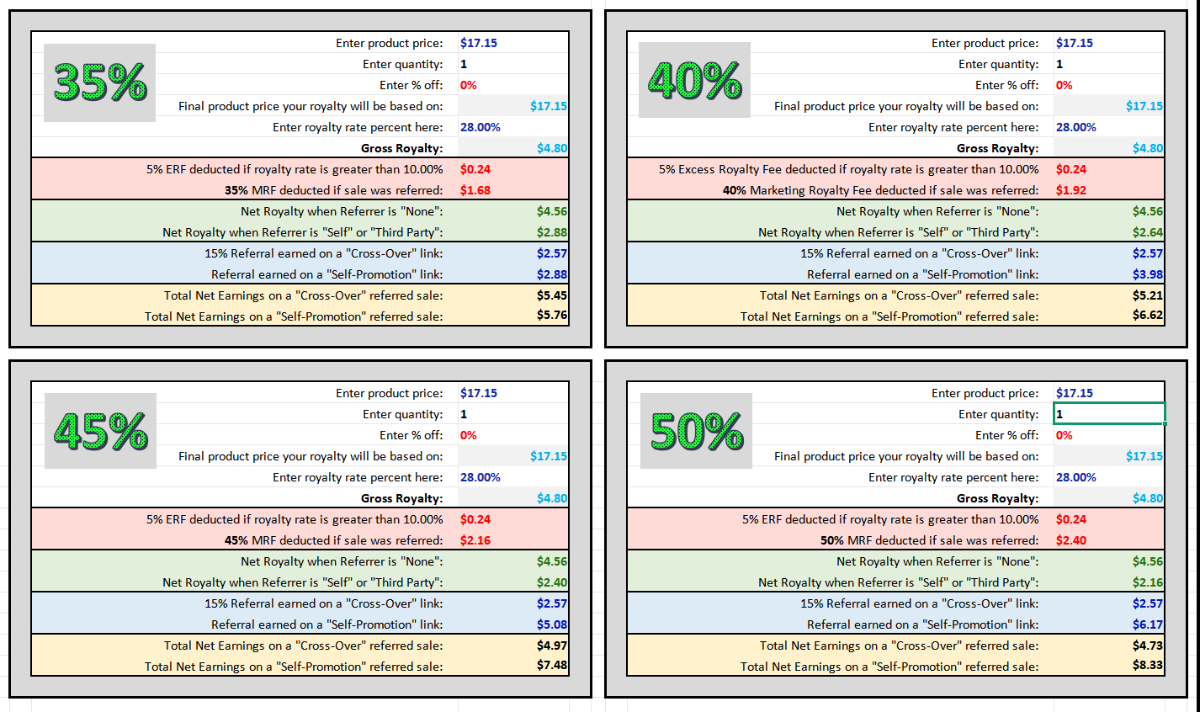
Look at the numbers in the yellow sections.
While total earnings on a Cross-Over link decrease as the cat rate increases, it’s the inverse for a Self-Promotion link, total earnings actually increase as the cat rate goes up. That’s because the MRF is a percent of your royalty while the referral commission is a percent of the total the customer paid.
Well anyways, here’s the link to download the free sheet:
https://colscreations.com/SharedFiles/AP_EarningsCalc.xlsx
* As before, you need to first put your royalty percent into Zazzle’s calculator to get the actual list price for the item, and plug that list price into my sheet.
(Also shared here.)
P.S.
Have also disabled the link to the temp sheet I posted above on 3/27