WRONG WRONG WRONG!!! Would u like access to my account and maybe YOU can do it because the max I can do is 204 and then I don’t see the progress in real time.
I go to products in a particular store and go to store management. I click on “needs optimization” and then I choose “select 204” the max I can choose. then I click “choose non-discontinued items” and then I click “make public”. of course the # does NOT go down by 204 so I have to wat till the next day to MAYBE see the 16,000 drop. and then I do the same process all over again. not 78 page, at BEST, 78 days??? If you know how to make public ALL that is hidden in one shot, then please tell me because so far ZAZZLE has not been able to tell me.
@tnestico wrote:
I don’t know where to go to see how many products I have, I found it once and then I forgot how to find it again;
In the back end of your store, look at the top right where you’ll see a number next to “results.” That will be the number of products in the store. If you have more than one store, you’ll have to look for that number in each store and add up the numbers.
1 Like
I know it because I studied computer science. To keep a website like Zazzle running every day you have to pay for all the thousands of terabytes people will use to update their images every day, you have to pay for software that will do the job of sorting the products and showing them in the marketplace in a specific order to customers when they search. You have to pay for software and hackers that will protect your data and your client’s data from people who want to steal it every day (your address, your credit card, important information).
2 Likes
To keep thousands of products that haven’t been viewed for a long time showing in the marketplace costs because the software that’s running to sort everything will have to deal with a larger amount of data. It takes a lot more time to sort 1,000,000 products than 10,000 products, for example.
3 Likes
Just one more example. Let’s say you have a small home business and you want to use Excel to understand your earnings. You have to pay Microsoft to use Excel, it’s not for free. Now, maybe you’re not an Excel specialist, in this case, you’ll have to pay for a course to learn how to use it or you will have to hire someone to use Excel for you. Your customers may have no idea about it. They may think everything is a lot more simple, but it’s not.
2 Likes
You will not see the progress in real-time, but it does not mean that you’ll have to wait to unhide more products. You have to go through the pages. After you do it for page one, scroll down and go to page two, do the same and scroll down and go to page three, and so on.
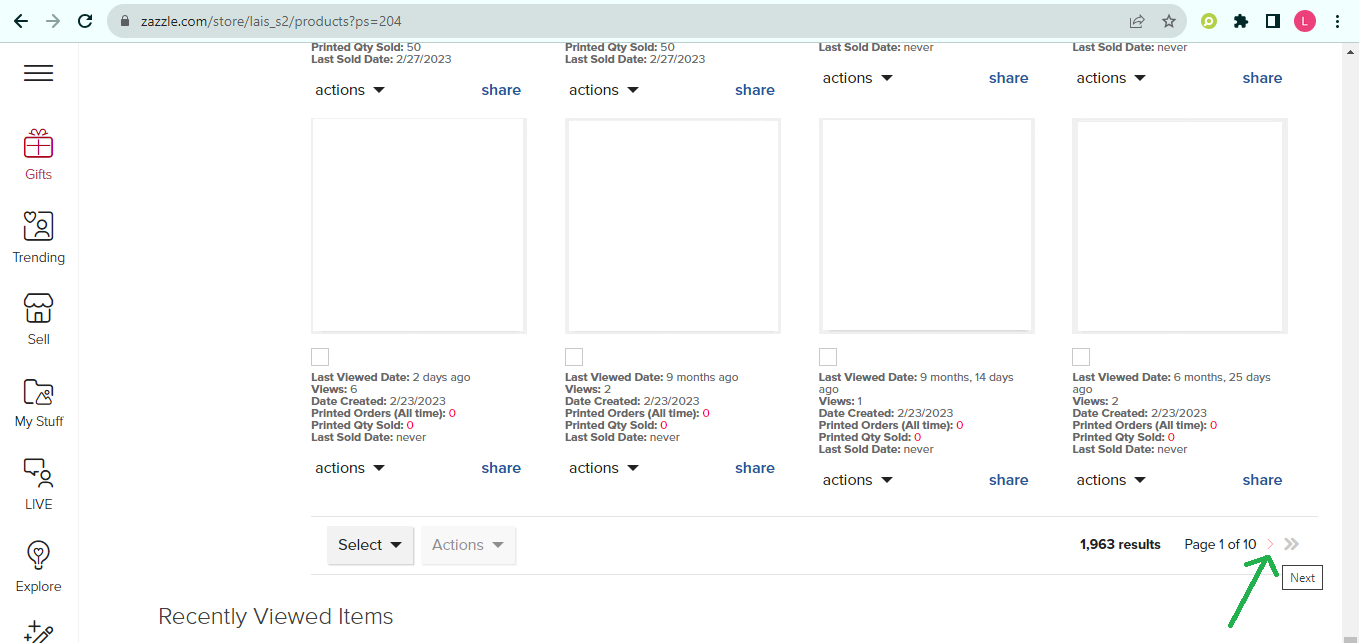
See the green arrow in this screen capture, it’s showing where you have to click to go to the next page.
instead of doing it that way. I just click on “select 204” the max that can be selected and then click “make public”. the fact that u cannot see your progress in REAL TIME makes me suspect that it is even happening. So if I spent hours, undoing what zazzle chose to do and then tomorrow I see that the number did not change, I have wasted a whole lot of time. I have 656 PAGES. you have 10 pages. Why should anyone have to do any of this?
they DO take a piece of our profits for that purpose. yes? then it is in THEIR best interest too to allow US to manage our products, delete what WE think should be deleted, and keep what we want to keep. The choice should be OURS. Don’t u understand how much $$$ u are losing by allowing AI to dictate what the public sees?
This is how you can do it:
- Copy this URL https://www.zazzle.com/store/yourstorename/products?ps=204&pg=1&vt=Apo and replace “yourstorename” with the name of your store.
- Press Enter, you’ll be on Page 1.
- Select to unhide all non-discontinued products.
- Now, use that URL again with your store name but replace the “pg=1” with “pg=2”, and press Enter, this will send you to page 2.
- Repeat the process.
1 Like
I have 656 pages. I can simply click “next page” at the bottom of the page, yes? and what guarantee do I have that the process worked? I can’t see the progress in real time.
yes, I agree with you BUT i cannot see my progress in real time, so if I did that and then tomorrow went in and saw that nothing had changed, then I wasted a lot of time for nothing.
You may not be able to see the results immediately, but the results will nevertheless occur, which is better than doing nothing with no results. Give it a try.
3 Likes
If you make changes and don’t see them reflected the next day, it generally just means that Zazzle is behind on indexing. I believe they’ve said that with the holiday rush indexing is lagging behind, so it might take 2-3 days for changes to be reflected, but I haven’t seen any situations where they just don’t stick at all.
2 Likes
I think most of us are not losing anything at all as we keep our stores up-to-date by making our products visible and viewing those pages every time they get hidden; if I am not selling is simply because customers prefer other designs… that’s all, it’s not Zazzle fault.
2 Likes
I don’t like some of the changes zazzle has been making which I feel are affecting my sales negatively so I now mostly add new designs on other POD’s. Maybe you should do the same
2 Likes
but suppose someone is looking for something, YOU HAVE IT, but zazzle has hidden it. NO SALE. They are letting AI determine what people want instead of letting people decide what they want.
I was talking in general not about your products… as you said: beauty is in the eye of the beholder!
When you select the Product Visibility as “hidden”, it will show you only the products that are hidden, with 204 being shown per page you won’t have 656 pages, instead, you’ll have about 79 pages (79x204 = 16,116).
I’d do it for you if I could but I believe it’s against Zazzle’s TOS.
You don’t seem to want a solution for your problem, at this point it feels like you just want to complain about it…
9 Likes
Thank you Barbara, I’ll do that!