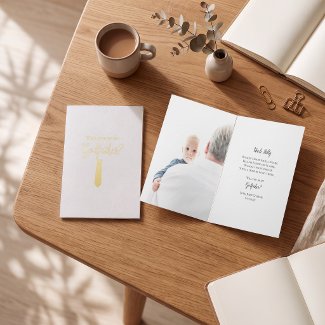
I’ve tried using the transfer option on the page, the transfer this design, and also a copy/paste design to a brand new foil. But, to no avail. Each time when I try to transfer the design, no gold foil folded cards show up…so there’s nothing to transfer them to. I believe it was created during a paper change, that just seems likely.
However, I cannot find any mention in the forum, except for very old '22 - '25 threads about foil issues or any recent paper change issues.
These were some bestselling cards, and I’d like help on getting those back up again, please. TIA for any help!
I’ve been dealing with this too! I noticed the issue trying to transfer anything to foil and I suspected it was to prevent a customer from doing that and somehow things going awry (since it’s not the most straightforward process)?
But a workaround I found that has worked for me -
Go to your foil card then click transfer. In the window that comes up, in the URL, copy everything after the word “custom” ( it stars with ?td={ )
Open a new foil card.
Paste that ?td={… in place of everything after the product type in the URL.
It transfers everything over - including title, description and tags. Sometimes things are on the wrong page but it’s easy to copy and paste to the right one when all the elements are there.
Hope that is helpful in the meantime! I wish it were more straightforward to get these discontinued cards moved over!
But for some odd reason, it is putting a clearly locked “Designed by link” on the front of the card, instead of the back, where I think Zazzle was adding that. Did you run into that problem? I could probably put a white element over it to cover it up, but I can’t hide it or delete it. So strange.
Oh no!
So far I’ve only had time to transfer one foil design. I think that did happen to me but I was able to unlock it and move it. Hang on. I’ll try one more real quick to see how I got that to work for me.
(I am hardcore procrastinating so happy to do something productive while avoiding other tasks!)
This is so crazy! For whatever reason, putting an element over it and going on actually worked, I guess as long as it’s white color. Idk, though, I’m worried I’ll have problems with this on down the road!
And one update, the second one I tried to do the same exact way. It’s throwing a large photo templates on the front, as well as on the inside left (and this one is the only photo template), and then another photo on the right! The front foil and the inside texts and graphics are all gone, just these repeat of photo templates!
Aw man! Sorry that didn’t work! It definitely isn’t seamless for me but certainly a little easier with all the elements plus tags and such copied over. Good luck! I totally missed that those old foil were discontinued - I had a couple solid sellers too.
This is the one that I got transferred by this way, but if you go look at the videos on it, they don’t look like videos anymore. Just still pictures that do like a .gif file would, and without any gold foil images.
Thanks. As an FYI this has been going on for a couple months. Product transfer for foil products disappeared around the time when the new foil colors were being trialled (prior to the formal release date)
The team looked into this. Foil products not showing up in Transfer is intentional, not a bug. Around the end of July, foil and spot UV products were removed as transfer destinations.
The reason is that transfer can’t tell which parts of a design belong on the foil layer. It moves the artwork onto the regular print layers and leaves the foil layer empty or distorted. Customers were ordering transferred foil cards and getting no foil, so transfer to foil was switched off until there’s a smarter way to handle it.
That’s also why the manual URL workaround in this thread behaves oddly:
Elements land on the wrong side.
The locked “Designed by” element ends up on the front.
Photo templates repeat.
The foil isn’t carried over.
It’s the same transfer path, just reached by hand. We’d recommend not using it for listings you plan to sell, because the foil layer may not be set up correctly even when the preview looks fine.
For now, the reliable way to bring these designs to the new foil folded card is to rebuild them in the design tool. Start from a new foil folded card, add your artwork, and place the elements you want in foil on the foil layer. We know that’s more work for bestsellers, and we’ve shared your feedback that an easier way to move discontinued foil designs would be really helpful.
Since there were others having some similar issues. I thought I’d share that I was able to take my link and go on an incognito mode through to the Design Editor. This helped me to be able to copy/paste text over, if that’s anyone else’s issue. For me, I couldn’t even get to the text while logged in due to the photo templates.