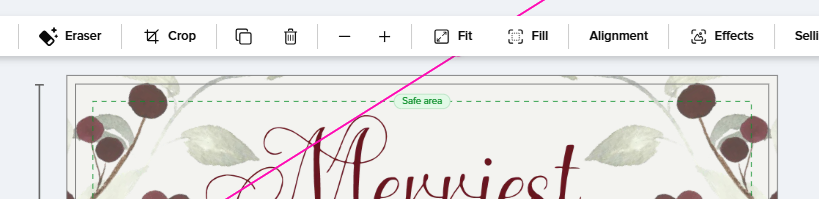
When in the design tool and clicking on an element or text, the horizontal tool bar pops up across the top of the design area. This tool bar is super helpful, but it blocks the top of the design. If I have a frame I am adding to an invitation, lets say, then the tool bar blocks the “handle” to grab the frame at the top making it where I can’t move it. Sometimes, I zoom in really close when I design, so zooming way out to be able to actually click the handle is not good because I need to zoom back in to make sure I get it placed right. Please add a little “collapse toolbar” option so it hides that tool bar under an icon in the corner of the design screen so we can easily hide it and then unhide it as needed during the design process. If there is something like this already and I am missing it, please let me know as it would help out a lot.
Hi @S_Joy I am flagging this with the design tool team and they have asked for a screenshot of the issue you are encountering with the tool bar blocking the design area. Can you put a screenshot here in the thread and I will pass it onto them? Thanks - Joanna
@Joanna It happens when zoomed in. You can see the pink outline for the edge of the element but the part that has the handle goes behind the tool bar. Then it becomes a thing of zooming in and out, back and forth every time I want to adjust that element. In this screenshot, I am zoomed in at 275%.