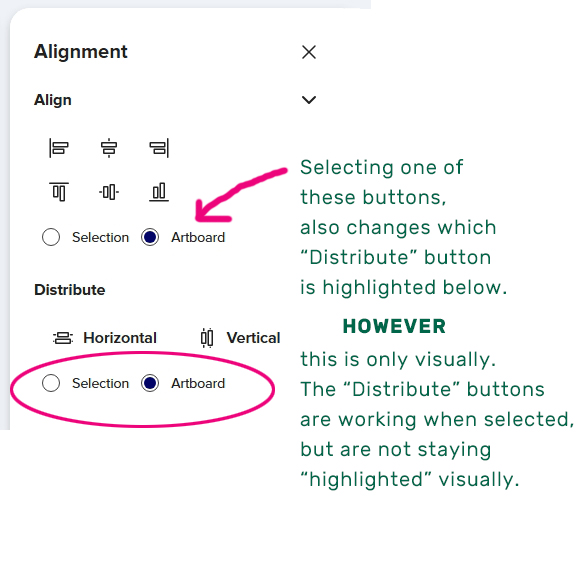
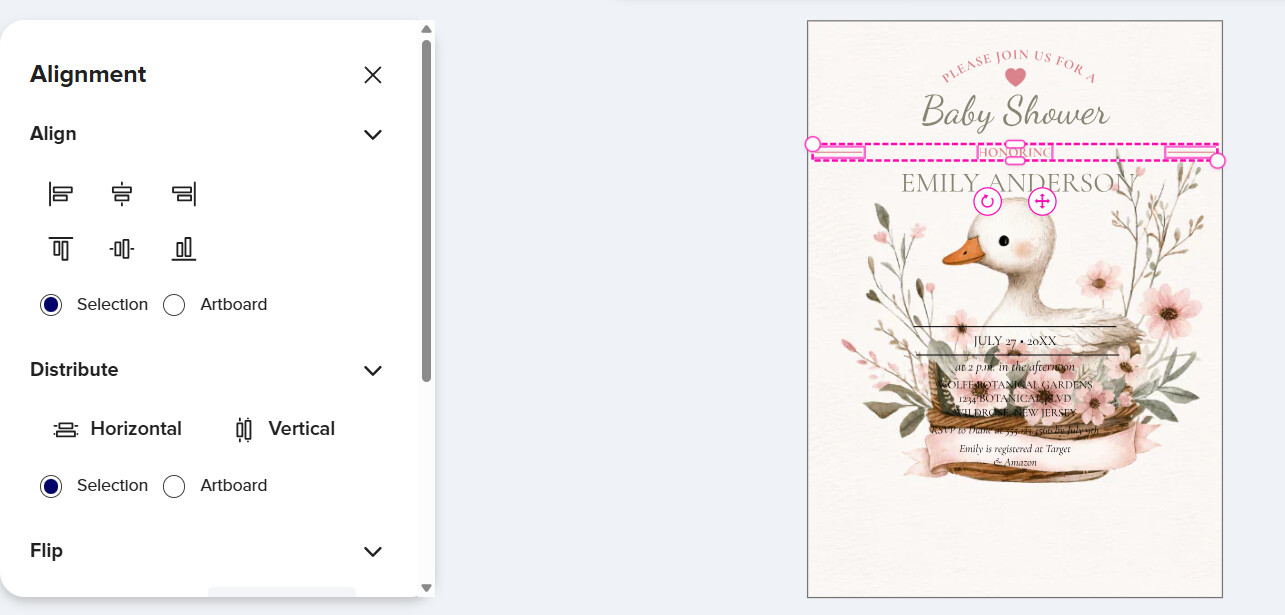
Additionally, there’s a new issue with the “Distribute” buttons: the “Selection” and “Artboard” buttons do not remain highlighted, even though the command is being registered.
Curiously, clicking one of the “Align” buttons above also affects the highlighted state of the “Distribute” buttons, though it doesn’t alter which one is active.
Thanks for bringing his up again, @SheaPrints
Several people have already commented on this and this is something that affects customers directly.
Or is it intended that this “design tool” is something like a puzzle game?
I am assuming most customers are at an age that they don’t enjoy playing hide and seek any more (nor have time for it)
Here’s what I was seeing: To me, testing both the Vertical and the Horizontal selections; Test #1 was when I used a vertical project [sized 4.25" x 5.5"] and the Vertical Distribute works to spread out your multiple text lines vertically in a extremely large way, not consistent with ANY anchoring lines as it used to do. Test #2 after changing the project to a horizontal one, same size, and testing the Horizontal Distribute, it does the same without ANY anchoring line of text or object. The *anchoring lines as I remember were your top and bottom line or object, that you’ve highlighted in the layers section, and everything moved based off of those two anchors to adjust the space. Now it seems to be anchoring to the border line. So, this seems to be the real issue that we’re having, and that should be the problem to be fixed back to what we were used to.
I also believe the Horizontal and Vertical icons should remain as they are. They do not appear wrong to me.
And as for the button selections, I think they “connect” because they’re within the same function. However, why have two when they both act as one, now I concede to that reasoning, to just have one set of Selection and Artboard buttons.
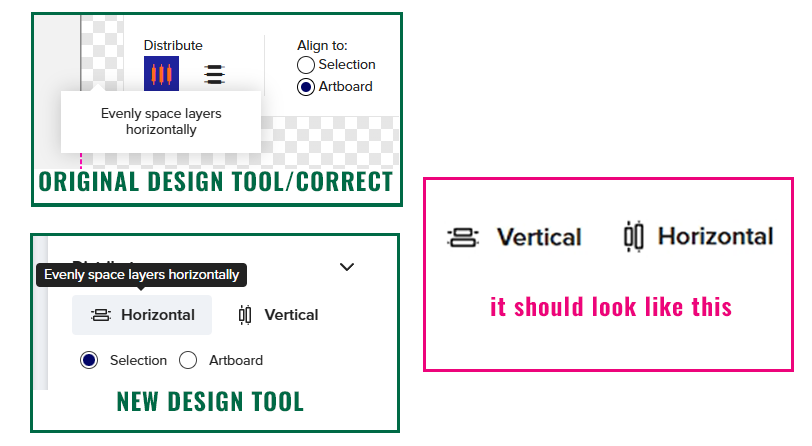
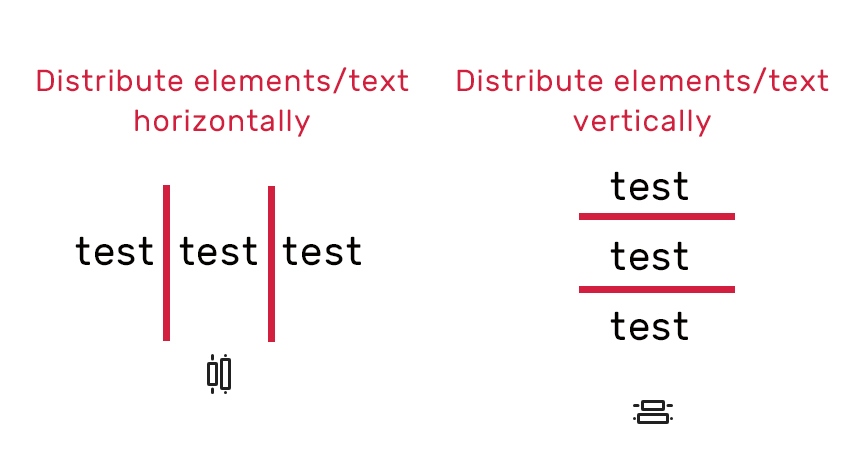
@LauraLee The “Distribute” icons were correct in the old design tool, it’s the standard way they’re shown. However, the new design tool shows them swapped around!
The new issue affects the radio option buttons for “Distribute”. While they do function correctly when a different button is selected, it does not remain highlighted, creating the appearance that it is not chosen. This is further complicated by the fact that selecting a button for “Align” also changes the corresponding “Distribute” button. However, they are NOT linked, this visual change does not affect the functionality of the “Distribute” options.
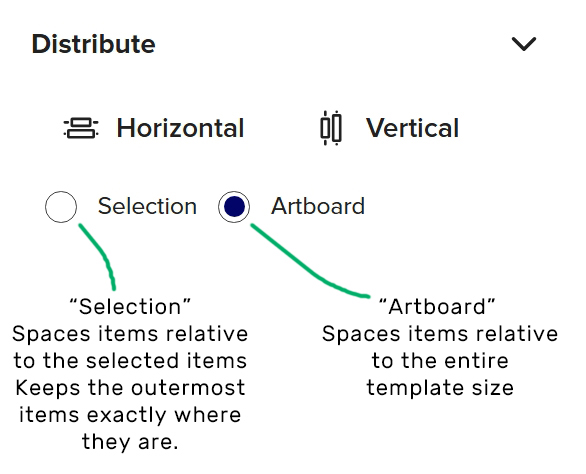
When you say it’s not “anchoring” the lines, do you mean it’s not distributing the items relative only to the selected items? That does still work for me. After you’ve selected your items on the design area, you have to select the " Selection" button, and then choose horizontal or vertical.
I get what you’re saying about the icons, and my best guess is that this was done for customers who may not understand what it does. [It’s the opposite of what they may think.] They just look at an icon visually, and think it should correspond to what it says. Imho, those icons do not match what the process is.
As far as anchoring, yes, it was not anchoring to the selected items, with the selection button for me. Could it be another problem that it’s deselecting the “selection” and defaulting to the “artboard”? Idk.
I think some had problems with it even in the old design tool. I just wouldn’t use the _Distribute _tool very much until it’s fixed.
It seems the distribute selection option isn’t working. It distributes the items across the artboard instead of the selection, which means we can’t space items evenly. I hope this bug gets fixed soon.
I, too, am having issues with the distribute tool. As Moonstone stated, the boxes are spaced across the artboard rather than the selection. A huge pain in the you-know-what. For me, it stopped working when the tool was moved to the left.
@dmboyce@Moonstone@NHW This may depend on what device you’re using (I’m using a PC) however, I can still distribute elements across the “Selection” with this workaround.
There are two major issues with the Distribute radio buttons and they are incredibly confusing!
It appears as though a button hasn’t been picked since it doesn’t stay highlighted.
It worsens the issue if the Align “Selection” button is selected, since it prevents the Distribute “Selection” button from functioning.
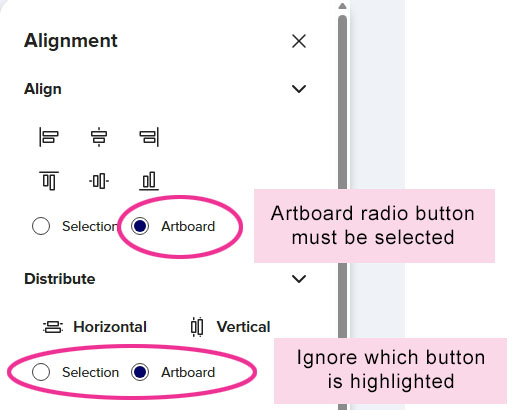
This is the only way I can get the Distribute “Selection” to work:
_IMPORTANT _make sure the Align “Artboard” radio button is selected
Select your elements on the design area
Select the Distribute “Selection” radio button (IGNORE the fact that it won’t stay highlighted).
I also noticed this started happening when the tool was moved to the left of the screen. It’s a real issue for us and customers. I hope it get’s fixed soon!
So sorry, Susie, gave your workaround to someone else and came to find your name to credit you, and see I forgot to come back and thank you at the time. Your solution made life much easier, so thank you!
Thank you so much! I should’ve looked here sooner as I’ve been trying to eyeball it and could tell the smallest repeatable moves I could make weren’t cutting it.
Same issues as others, trying to distribute a selection wasn’t working until I tried this workaround. Also the buttons look reversed.