I’ve noticed just in the last day or two that I cannot select multiple text boxes (each box having a different font size) and hit the + button to re-size them proportionately. Doing so now changes all of smaller text to match the same size as the larger text selected. Hopefully this gets fixed - I rely on this tool a lot and it’s quicker than dragging the corners. Thanks!
@KimJ I can still resize multiple text boxes proportionally using the plus and minus buttons. For me, this only happens when I try reducing it beyond the minimum text size for that product. Is this happening on all products for you?
Yes, it’s happening to me on all products. I just tried again on a banner. I hit the plus sign, and the smallest text jumped up to the same size as the larger text, while the larger text had no change.
Sorry to hear you are having this issue KimJ. Can you give me a product link / screenshots so I can look into this for you. Joanna
@Joanna It’s in the Design Tool, so a product link won’t help. If I select multiple text boxes and click the plus sign, it’s defaulting every text box to match the size of the largest text. It used to allow me to scale them proportionately with the plus sign tool, e.g., allow me to re-size the large, medium, small text all at the same time, while keeping them each a different size. Hope that makes sense.
Can you please provide a link to the product? This will allow us to have a starting point as we look into reproducing the issue.
@Scott It’s not a product issue. If I start fresh in creating a brand new product in the Design Tool, it still gives me the same outcome. I’ve also tested it on Edge, Chrome, and Firefox to see if it’s a browser issue and it’s not; the same thing happens on each browser. Thanks for looking into it. Is there a way I can get a short screen recording video to you?
@KimJ Are you pressing the font size + or the + next to alignment?
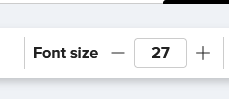
or
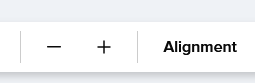
If you press the Font Size + (with font layers both selected) they will both resize to the font size in the box (eg -in my screen shot - they’ll both resize to 27)
If you press the + to make larger - both the font layers will increase
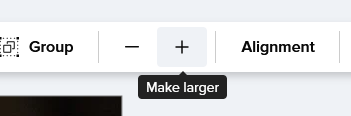
1 Like
Oh, bless you @Sara_H I usually rely on my keyboard shortcuts and it wasn’t working in the Design Tool for some reason, so I opted to use the menu bar instead. And apparently didn’t realize there were two places to scale! Well, now I feel foolish but I certainly won’t forget it.  Thank you for being so thorough and sharing screenshots!
1 Like