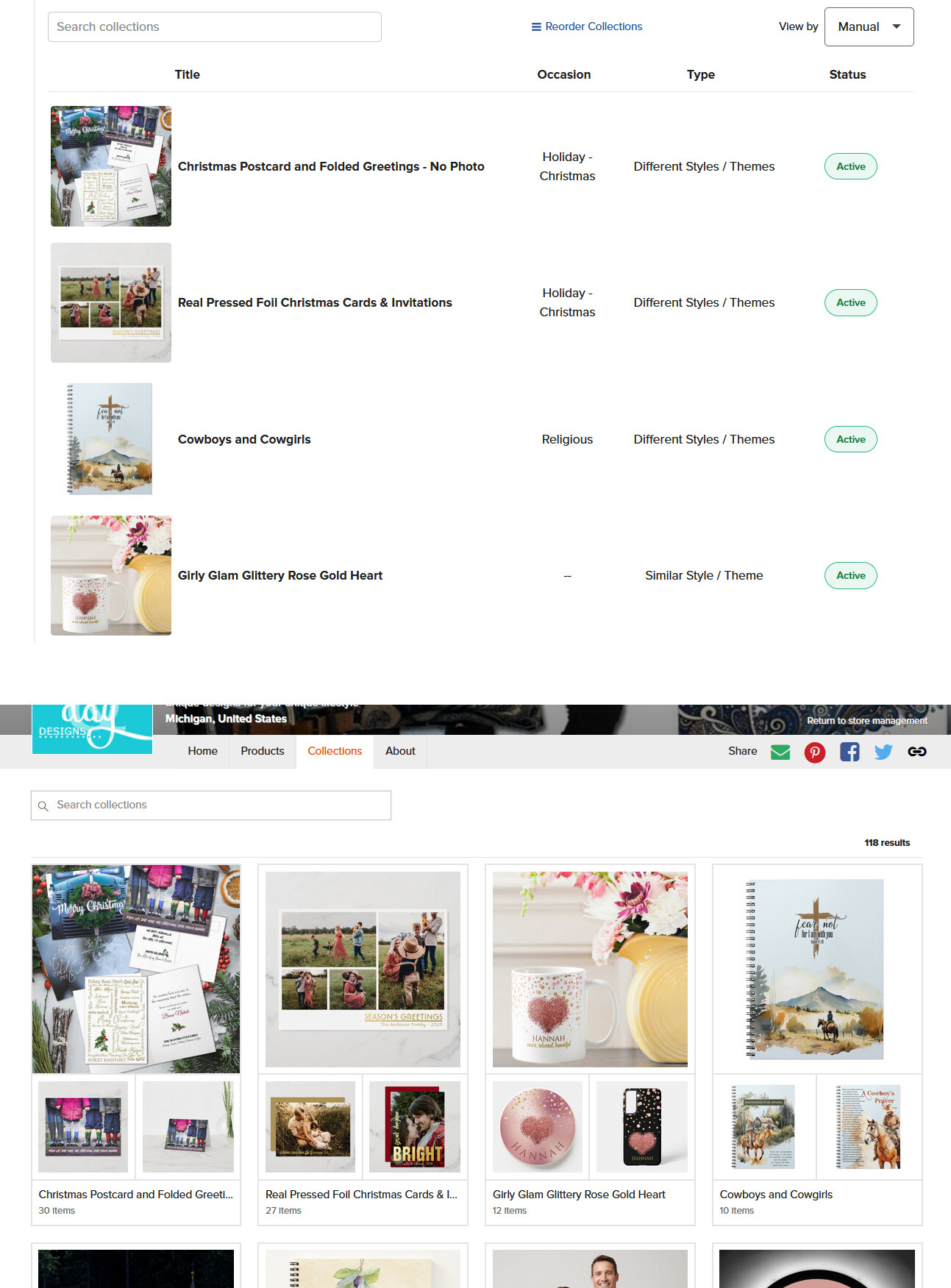
Am I missing something? Going through Collections because of the new set up and when I look at public view of my store, the order of the collections appear to be random. I don’t see where I can reorder them the way I want. It appears that the only reordering is in the store management view but it doesn’t correlate to public view.
Thanks for your post and I’m sorry to hear you’re experiencing an issue here. The order of your Collections in your store management page appears to correlate with the order of your Collections publicly. Can you provide a screenshot for example of the error so that we can better understand what the issue is? Also, I moved this to “NEW!!! Collection Types Information” so that we can keep all feedback and comments related to the Collections update together.
The same thing is happening to me.
I have reordered in the back end, but it is different to what the customer sees.
That is on the customer interface - what the customer sees - there is no change in the order of the collections despite this changing in the back end. Unless it takes a while to populate…but then how am I seeing the changes in the back end…
Since yours is working, can i ask , is the order in the public view the same order in admin view? Because I’m still not getting the correct order. I “reorder” / “stop reorder” and things don’t stay. Also, since there are several ways to view in admin, I’m assuming the manual order is what actually translates to the public view and the other options are just for store owners convenience?
Every time I change something in the back end (top pic) the public storefront (bottom) corresponds. I have it set for manual sort. I don’t know about the other sorts as I haven’t used them.
That’s what I expect to see but that’s not what I’m getting. I reorder them. Go check the public view and when I go back to admin view everything is back to the original order.
Thank you for helping. At least I know it’s supposed to work as expected.
I have the same problem. I have followed the same steps as Diana, (“order” collections, then select “stop reordering” and made sure the view is in “Manual”), and still, my collections on the “Public” view remain unchanged and in the wrong order.
I had problems organizing my collections long before these new collection settings took place, so I wondering if there is a bug affecting some designers where our collections seem to be stuck, preventing them from reorganizing.
I have one last suggestion for you. Have you tried clearing your cache and doing a hard refresh? (ctrl+F5 on a PC for a hard refresh). Don’t know how to do it on a mac.
Thanks for your reply Diana, but yes, I already cleared and refreshed everything on my end, and still my collections are showing an “old” order. I think there is a bug on Zazzle affecting some accounts’ collections. I found another thread about it under “Technical Issues” and it seems Zazzle is looking into it, Thread: https://community.zazzle.com/t5/technical-issues/reorder-collection-doesn-t-save/m-p/95745
When I click “Reorder Collections” the order is not the same as in the public view, which makes it a bit confusing to continue ordering the collections.