Deleting / Hiding Collections

Apologies!  I tried to find this topic in the forum, but I couldn’t.  

I thought I locked some of my collections so the public couldn’t see them.  But when I was logged out and went to my store, I saw the collections I thought I locked were public.  Clearly, I did something wrong.

How do I hide some of my collections?

Thank you!

from the Edit button of your collection, change the Privacy setting from Public to Private.

1 Like

Oh, good grief!!  Right in front of my face!  I clicked the edit button and just glided over it.  Sigh.  

Thank you!!

Hi! Adding to this tread as it was a while back and I’ve just searched by clicking on the edit buttons of my collection but I’m not seeing where to change the settings from Public to Private. Has this changed since the new layout of collections? Any help would be greatly appreciated!
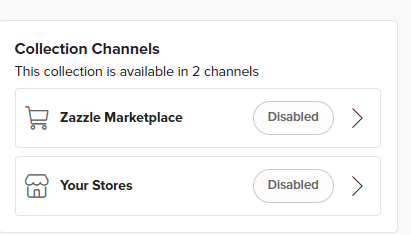

@elle  I think it’s changed now

To make your collection 'inactive (I think that means private though not 100% sure) you need to disable it from the marketplace and/or your store

you do this clicking though to both and sliding the green button over to grey then save

that will make your collection ‘inactive’

Sara_H_3-1723162388897.png

though I could be 100% wrong

3 Likes

