Cherie
August 5, 2022, 5:00pm
1
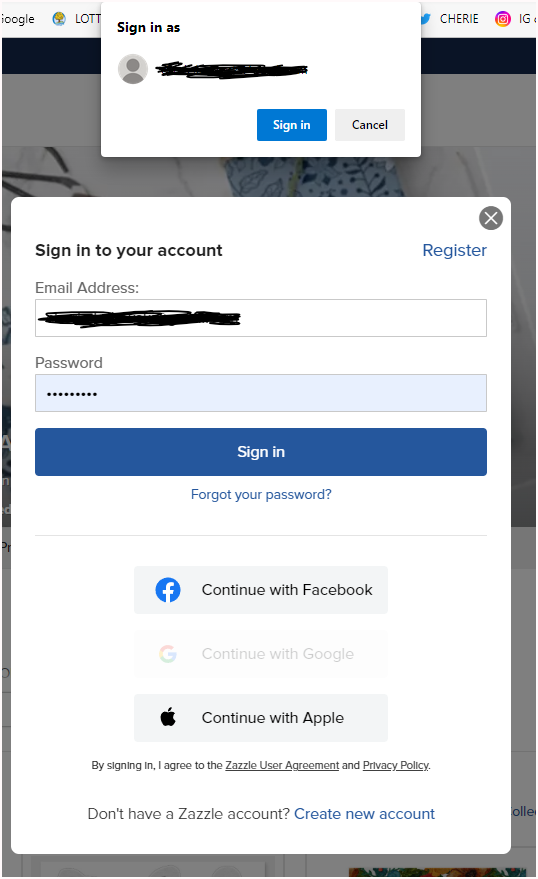
The pop up at the top, do you know if this is a Windows or Microsoft or some other place sign in pop up?
I should add, I’m trying to make it stop and cannot find out where to do that, I’ve searched and Googled it, just cannot find how to make it STOP!!
Thanks for any advice!
Connie
August 5, 2022, 6:58pm
2
That’s a Google issue, not Zazzle. You have to go into your Gmail account, and change the settings to NOT ask to sign into sites.
This article explains how to turn it off: https://gadgetstouse.com/blog/2021/07/20/remove-sign-in-with-google-account-pop-up-from-websites/
4 Likes
Cherie
August 5, 2022, 11:36pm
3
I already had tried this, it wasn’t toggled on. I thought it was the Microsoft account pop up. Thanks for trying!
Cherie
August 6, 2022, 2:51pm
4
THANK YOU CONNIE! After looking at my Google account again, I changed the background to dark mode. Sure enough, the pop up was dark, it was Google! I had the settings right but needed to reboot the computer. So, it didn’t pop up just now when signing in! THANKS!!!