Is it just me or the design tool has been glitchy for the past two days or so??  I can’t seem to move anything around or size anything. Everything just gets stuck and then moves in all the wrong directions after a moment. I’ve been experiencing this both on mobile and desktop and just wondering whether it’s just me or some of you are also experiencing this
16 Likes
Yes it been a nightmare lately, I keep having to close the design tool and go to saved designs to start again and again 😠
9 Likes
Yes, the preview feature has a delay, and the move item forward/backward feature isn’t working at all.
5 Likes
Driving me batty! I position an image and it suddenly snaps back to where it was, or I’d open a design, and the images would just move on their own! I finally just gave up yesterday. Really frustrating. I hope it’s better today.
8 Likes
Same problems here on safari for iPad…
I’ve been having issues as well. It freezes or rearranges the text and images when I didn’t want it to. I also had occasional problems with the zoom tool doing the opposite of what I wanted it to. I’ve tried Firefox, Chrome, and Edge, but it doesn’t seem to matter which browser I use.
4 Likes
@vimbaiz Thanks for posting this. I thought I was having issues with my recent upgrade (or downgrade?) to Windows 11. And also with the grids, that keep giving all sorts of troubles. But maybe it is related to the ill-thought out AB or whatever test.
2 Likes
This has been going on with me for a few months, actually. I thought it was just something to do on my end. I have the same glitch design tool. Sometimes it snaps things back after I moved them. Other times it freezes up and won’t let me do anything and I have to go back to the product page, refresh it, and then click edit to enter back into the design tool. Sometimes I have to repeat this process multiple times during the creation of one single product. Lately the font tool is totally lagging for me. I can go through and click to change a font and it just sits there not doing a thing. Then I have to run through the process I just described to get it to work again. It has made things quite difficult even on simple designs.
6 Likes
Exactly  .. you’ve just explained it all in detail. That’s exactly what’s happening with me as well. I thought it was just my end and probably my softwares acting up but my brother said everything else else is fine so it had to be something going on within the site that’s why I ended up asking here. It seems we’re experiencing the EXACT same glitches and that in itself cannot be a coincidence
1 Like
So I guess the problem isn’t from our software back end it’s from Zazzle’s end because we’re all getting the EXACT same glitches. That can’t be a coincidence surely personal glitches should differ from one computer to another or one browser to another. But different continents and timezones let alone computers experiencing an EXACT same thing
4 Likes
@Scott Could you please move this thread to the technical issues? Thank you.
2 Likes
Same. I just finally gave up trying to do anything. Now I’m just stuck in promoting mode and yet I love designing more 
2 Likes
I hope they fix this soon. It’s really frustrating 
1 Like
The only relief I’m getting from all this is at least it’s not my computer acting up  hope they fix all this soon
2 Likes
Same issue here
1 Like
Yes same. Been moving funny or getting stuck. Also sometimes when trying to re-size things it only allows big size jumps, not the normal small movements.
4 Likes
It’s really impossible to work with the design tool. It is completely broken.
Just an example:
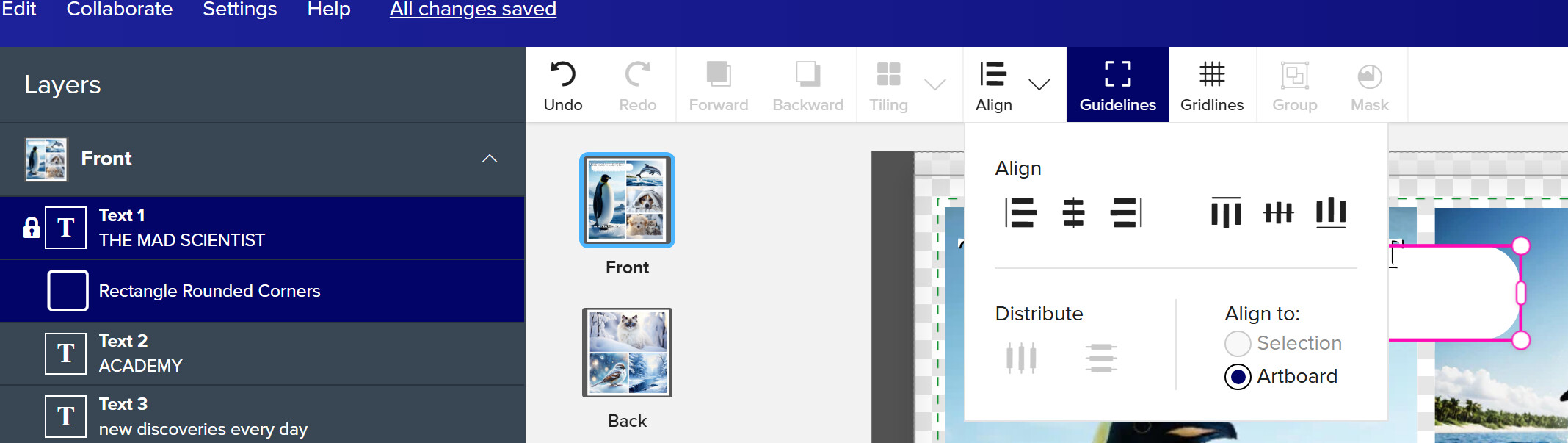
I have two layers selected and cannot align the selection.
https://www.zazzle.com/mad_scientist_photo_collage_school2_binder-256514714863832543 (hidden product).
Admin, do you know when this will get fixed? Yesterday, it was doing okay - not optimal - but at least workable. This morning, not at all. It’s unusable.
2 Likes
From that screenshot it looks like you have the text layer locked accidentally.
Yes, that’s part of the glitch.