Hi! Newbie here. I’ve gone through some older threads and I’m still not finding a way to download my designs. It appears the Zazzle UX may have changed in the past year or so. If anyone could share a screen shot of where I should go to download my designs I’d be very grateful. Thank you!
@MJDesignLabs Unfortunately you can’t download direct from your images easily.
Have a read through this thread where there are already screenshots https://community.zazzle.com/t5/ask-a-question/how-can-i-download-my-images-from-my-image-albums/td-p/21757
You need to go to the Create panel from your store home page to start with then set the dimensions you need then search for the image you want to download, place it in the design tool - then download.
Hi @Sara_H - thanks so much for your help. I did go through the screen shots. I’m not seeing where the download option is in the design panel. Here’s a screen shot - perhaps I’m in the wrong area? When I open the full image browser it only shows elements I’ve uploaded from my desktop. Should I be adding designs I created within Zazzle to the image browser? If so, I’ll look for how to do that - if it’s a thing. Thank you again!
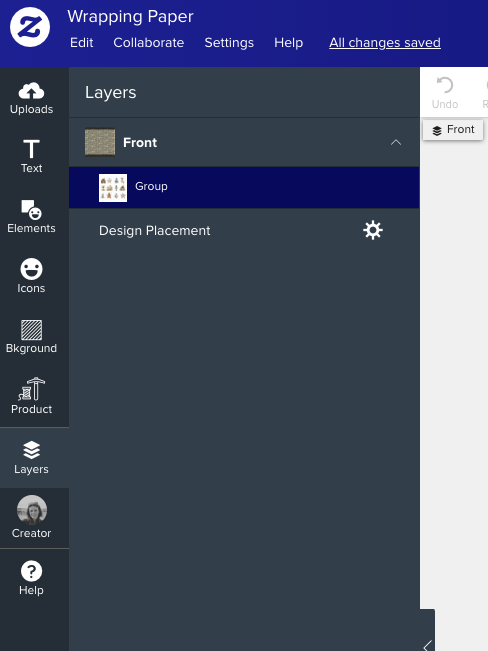
You’re in the wrong design tool to start with that’s why you’re not seeing the download option.

From your store back end - look on the left hand side for the Create Button - that’s the design tool you need to put your designs in.

then choose products or digital on the left hand side then on the right hand side - change the dimensions as needed.
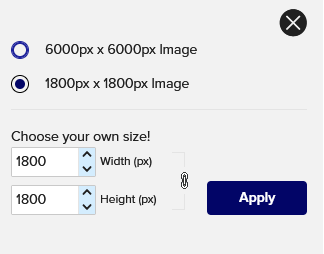
You can then add your images and download

Got it! Thank you!!!