One question about this rollout is whether Zazzle is aware of the Web Content Accessibility Guidelines for keyboard use?
4 Likes
I too dont like the new design tool. I cant even see the name of my graphic files.
9 Likes
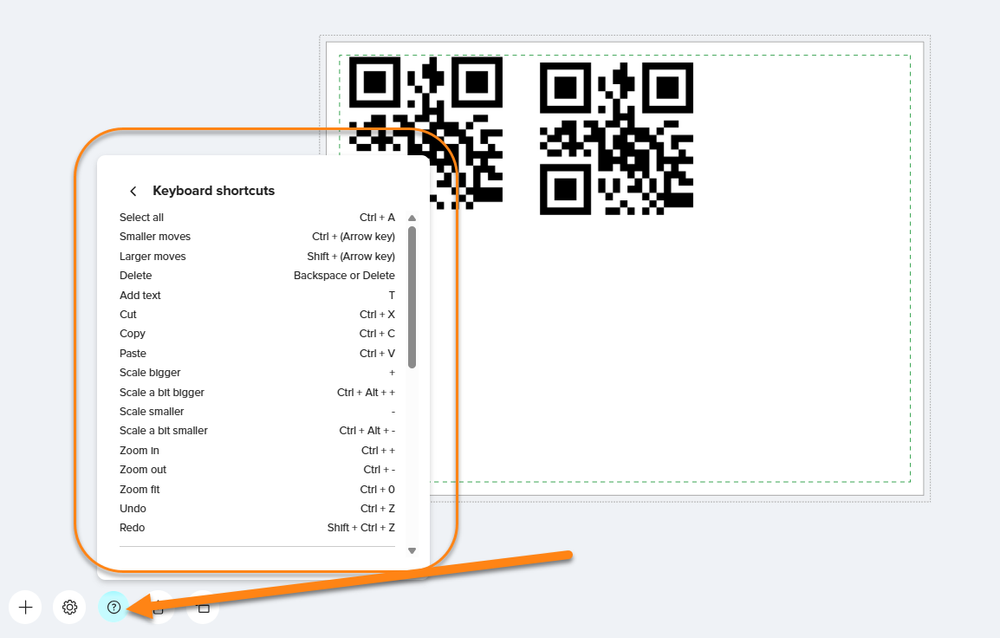
On your computer, with the mouse, right-click and you will see many options, including copy and paste. You can also use keyboard shortcuts.
2 Likes
On your computer, with the mouse, right-click and you will see many options, including copy and paste.
You can also use keyboard shortcuts.
You can also use keyboard shortcut.
On your computer, with the mouse, right-click and you will see many options, including copy and paste.
I asked Zazzle for help yesterday thought it was a glitch, this is what Zazzle answered me this morning.
Unfortunately, all creators are on the new design tool now and cannot change this, Tatiana.
Kind Regards,
4 Likes
Copy and Paste
On your computer, with the mouse, right-click and you will see many options, including copy and paste. You can also use keyboard shortcuts. Copied from another post.
1 Like
On tablets without an attached keyboard hooked up to it, or via a smartphone you cannot do that, as it’s not the same as being on a PC with an actual keyboard and mouse set-up. I use my Samsung tablet and Samsung smartphone that’s like a tablet with my S-Pen’s for them.
Unbelievable these bad changes made to this new design tool by whomever did it at Zazzle! It’s terrible both as a designer, and for customers. There was nothing wrong with the old design tool, whether as a designer or customer, it was much more user-friendly and more straightforward than this new design tool thing! Glad I was able to create a number of new designs within our old design tool last week, because it doesn’t look like I would have been able to create them via this new design tool! I clicked on several of my previously created designs this morning of different items via my smartphone and some come up with the old design tool for some reason (but glad they do!), and other items come up in the terrible new design tool which I do not like and cannot do what I used to do anymore in it!
11 Likes
On the mobile version on an Android smartphone, the old tool is still showing. In the app, I don’t know, because I don’t like using it.
1 Like
I do not ever use the Zazzle app for my Android devices (I do not like the app version, therefore it is not installed on my devices). I always click for desktop view on both devices. I haven’t gone on my tablet yet, but am thinking it’s probably the same as on my smartphone with some product items opening up to old design tool, and other items opening up to the terrible new design tool, as others have also said the other day they also were seeing on their end.
I don’t want to, and I also cannot create my designs anymore from either of my Samsung devices like I used to always do within Zazzle’s design tool, now that we have this new convoluted design tool! It’s terrible.
Also, I always loved Zazzle’s old design tool and creating all of my work within it by adding in my Original Artwork and Photography, and adding in their element shapes too for all different types of designs! I now can no longer do any of that. It was so convenient and pretty easy to create any type of designs within the old design tool! As a customer I would also hate this new design tool, even for a simple edit change to personalize something! I would get frustrated and just leave the site after wasting some time on it! What was whoever did this to the design tool even thinking! Such a shame.
10 Likes
I don’t use the app anywhere.
On my Android mobile phone it’s the new version, but in the proposed buttons there’s a “duplicate” option. It does not solve the problem when you want to copy, for example, the front side of a pillow on the back side, but it’s better than on iPad.
The iPad on which I work doesn’t have a keyboard so no keyboard shortcuts, there are standard ways of getting a context menu ( long touch, three fingers pinch… ) but none of them work with the new version of Zazzle website.
I borrowed a new iPad with a keyboard to a friend, and even on this one using the cmd key + c and cmd + v on the keyboard it doesn’t work. So, no, I don’t think it works on iPad tablets. And apparently from what I saw in another post, it doesn’t work on Microsoft tablets as well…
3 Likes
Where are the align options, or make pattern??? Or we should design everything in Photoshop and just add the text using Zazzle design tool?
3 Likes
Why in the heck would Zazzle make this change permanent yesterday — and with no advance warning — when the new version of the design tool is full of bugs? What were you thinking, Zazzle?
13 Likes
James gave us advanced warning in his “post for sale experience” notification. He indicated they were targeting beginning of March to retire the old design method. I must admit, I am just beginning to learn the new tool today out of necessity, so it’s all new to me!
1 Like
Same here – but the really sad answer is – it has a lot of function – BUT – before doing this they needed to come out with a group of little video’s explaining how to find all these functions instead of having us struggle to figure it out. That is truly what I thought they were going to do. That disappoints me. Let me tell you one that I just figured out: click on a line of text – that enables Edit – that brings you to Text Effects and hiding under Text Effects are many things that we want: opacity / tiling/ shadow / stroke / letter and line spacing / text orientation / curvature. That’s pretty neat – if you knew if was there.
3 Likes
Hi Creators,
We made an announcement here: https://community.zazzle.com/t5/creator-news/follow-up-update-on-post-for-sale-flow/ba-p/240497
Thank you to everyone who’s shared feedback on the updated Post for Sale experience. We hear you, and we appreciate you taking the time to share your thoughts.
We’re moving forward with the updated flow, and all Creators are now opted into the new experience. This is part of our broader investment in long-term marketplace growth for the entire Community.
That said, development doesn’t stop here. We’ve documented the key themes and specific feedback you’ve shared and passed them along to the right teams. Updates and refinements will keep rolling out over time, and some changes have been made and more to come this week. If you haven’t already, please [submit feedback through the form] so your input is formally captured alongside other Community perspectives. If you’d like to discuss among other Creators, please use **this dedicated thread **so we can track conversations and feedback more easily in one area.
Thanks for being part of this Community - your engagement makes a real difference.
Best,
The Creator Team
1 Like
They have put a video link in the post with the initial announcement about the new design tool that is helpful. It walks through some of the features of the new tool and how to access them.
2 Likes
For me, the main problem is that the new tool is full of bugs. I can’t understand that one can launch something like that publicly without ensuring to be at least at the same level for all the functionalities as the existing tool. For now I touch it the less as possible, just add images in it, because each time I start to move something it freezes and I have to restart my design. Totally crazy ! And I stop making feedbacks about it, because I’m not a beta tester. The tests and corrections must have been done before launching the tools. If they want us to be their testers, they have to pay for our time.
7 Likes
@Heather “We hear you” … but you choose not to listen?
11 Likes
I cannot use it and used mobile version of old tool today and I miss our regular Desktop design version.
4 Likes