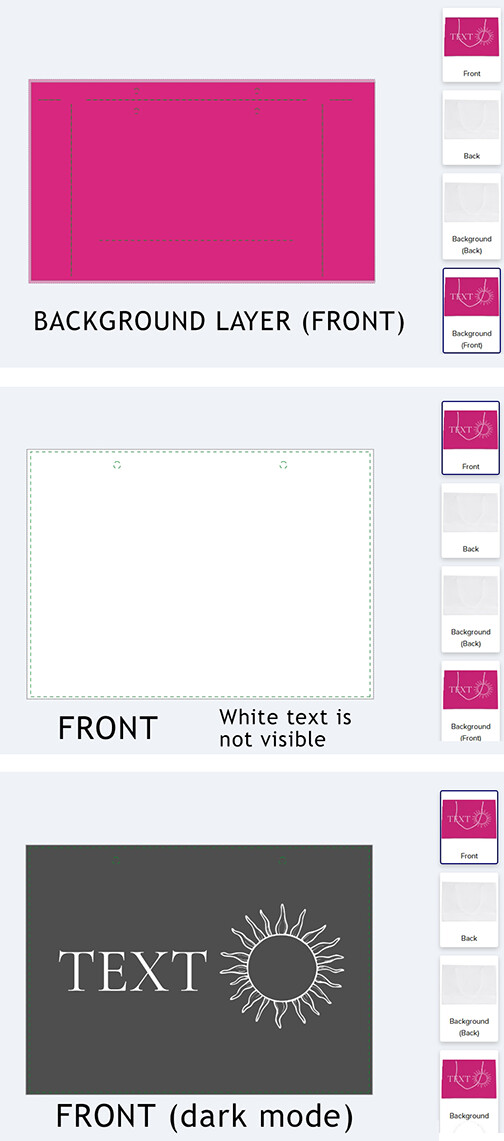
Products like gift bags and guestbooks have a separate layer for the “background” color or artwork. If you use white text on the “front” or “back” layer, it’s not visible in the design area unless dark mode is enabled. However, since dark mode isn’t the default setting for customers, the design area often appears blank! Sometimes I put all design elements on the background layer to work around this, but that’s not always possible. I think it would be much better for customers if they could see the background layer behind the design elements in the design area, this would be less confusing for customers, and allow them to better visualize the finished design 🤔.
8 Likes
Yes I was noticing this issue yesterday. I would have preferred to just put the black background on the ‘background’ layer, but then you couldn’t see any of the white text and I figured it would be way too confusing for the customer. So now if a customer wants to change the background color, they have to change all sides, which is annoying.
1 Like
@jophb Absolutely! I guess that’s how it needs to be for printing reasons, but it’s not helpful for customers. Even if a tinted version of the background layer was included behind the “front” and “back” design, it would solve the problem!
1 Like
Would a font “outline” help? It could even be the same color as the background color.
I think that’s harder for customers to know how to change because of how the Zazzle tool hides the stroke color tool . I think it’s easier for them to find the background picker, so I’d rather just add a background to all sides. At least ‘background’ is large on the left side… I don’t think ‘Effects’ is clear to customers at all - I still think all font colors should be together.
Plus on script type of fonts, the stroke/outline would cross over the main color.
1 Like
@BKMuir Since the design area displays as plain white, anything white, including artwork, becomes invisible. Additional elements might cause more problems for a customer if they want to customize colors. If the “background” layer is a plain solid color, then that color can be added behind the design on the “Front” and “Back” layers. However, that’s still confusing for a customer. The ideal solution is for the “front” and “back” layers to visually include the “background” layer in the design area!
2 Likes