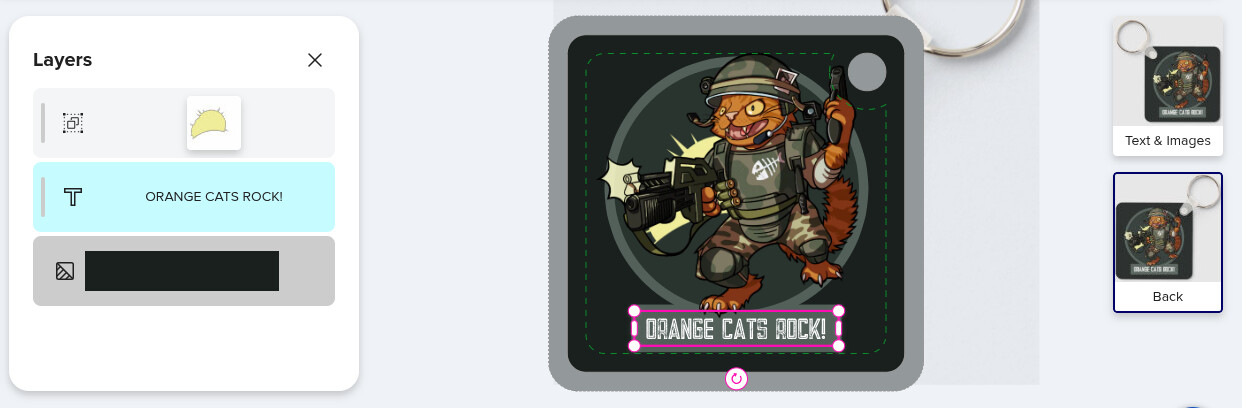
Working on an aluminium key chain today, I copied the layers from the front and pasted them onto the back. As you can see in the following image, while all images successfully pasted to the art board, many didn’t appear in the layer stack on the left (only the explosion, text and background colour appear).
Switching between views has no effect, the missing layers do not reappear. Quitting the editor and returning also has no effect, the layer stack remains incomplete.
@Zob1 This happens to me sometimes too. I think the layer tab is just lagging because when I manipulate something in the design slightly (or add a bla, bla temporary text) and I return to the layer tab all the sudden it shows all layers.
Thanks for the suggestion, I plonked a simple shape from the library down and my layers appeared 😊 The same fix I use when it’s refusing to paste from the clipboard.
I’m also having this issue. What is weird is that the layers were missing from the side I copied from, not the side I pasted to. I pasted an image and deleted, and it did update the layers on the ‘copied’ side, but then the layers disappeared from the ‘pasted’ side. I added an image on that side and deleted and again they reappeared on the ‘pasted’, but then they have disappeared from the ‘copied’ side AGAIN. It keeps swapping back and forth. If I click on ‘review’ and go back, the missing layers switch sides.
I think this definitely needs to be fixed. I’ve gotten messages from customers about things not updating correctly too. @Mark@Fiona
@jophb This sounds similar to an issue I reported a while ago! I noticed it on a tote bag featuring the same design on both sides. Elements were missing from the layers window on one side. I also found that when an element was repositioned within the layers, sometimes it’s corresponding layer repositioned on the reverse side, as if they was linked. This bug also affects older designs published using the original design tool. At the time, I was able to check those designs in the original tool and they appeared correct, so this must be something introduced by the new tool. 🤔