Can someone please tell me where the orientation option is located in the new design tool? I’m working on wedding suites, and can’t figure out how to choose the horizontal option for my enclosure cards etc.
It is now down at the bottom on the left side, near the Settings cog wheel.
2 Likes
I can’t find it. What does the symbol look like? Help please.
1 Like
@GabiwArt the orientation symbol looks like a rectangular fish (for some reason)
Orientation symbol
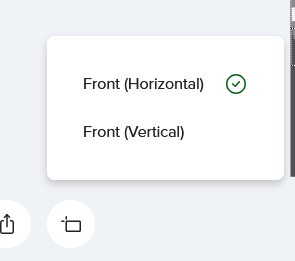
(or a chick waiting to be fed)
1 Like
Thank you for your reply, Sara.
For me, it’s just an almost empty field; there’s only a checkmark. The words aren’t there, and nothing is clickable.
Edit: I think the problem only occurs with tissue paper; I’ve tested two other products and it works with those.