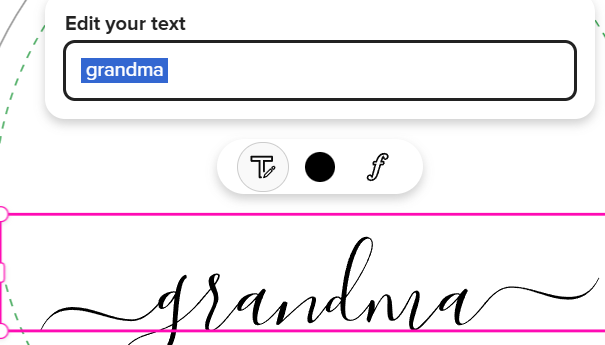
I just noticed that the symbols that appeared when using a swash at the beginning and end of a line of text for the Morgana font have disappeared. Now, there’s just a blank space. Please can we get the symbols back? I think it’s important for customers to see those symbols when they’re replacing placeholder text otherwise it’s too easy to remove the swashes without realizing it.
4 Likes
I forgot to mention that the customer is very likely to unknowingly remove the swashes because the entire text field (including the now invisible swashes) is selected if you double-click text to edit.
3 Likes
Hi @Nathalie this information may help you with your swashes query. Special Character Charts for Script Fonts (II)
Thanks, Joanna, but using the swashes isn’t the issue. The problem is that the design tool no longer shows a symbol in the text box where you have a swash like it used to. It’s now just a blank space, which means it’s very easy for customers to remove swashes without realizing it. In my example, there’s a swash before and after the text ‘grandma’ but it’s just a blank space in the text box with no indication that there’s a character on either side of the text that creates the swash.
3 Likes
I’ll be watching what happens to this query because I’ve been wondering since the design tool changed how the swashs were going to be handled by the customers too. Due mainly because the design tool is now supposed to be more “customer” friendly. *Wondering how the customers are reacting to Zazzle on this topic. Is it user friendly or too difficult to bother with for them? My only thought could be that it’s a creative learning process or something, at least that’s what I’ve been thinking.
2 Likes
It is doing it to me as well - as @Nathalie mentioned, the ‘space’ is there, but they are not showing. That will certainly cause a lot of angry customers. Not good at all. A LOT of people use those symbols, not just Morgana.
3 Likes
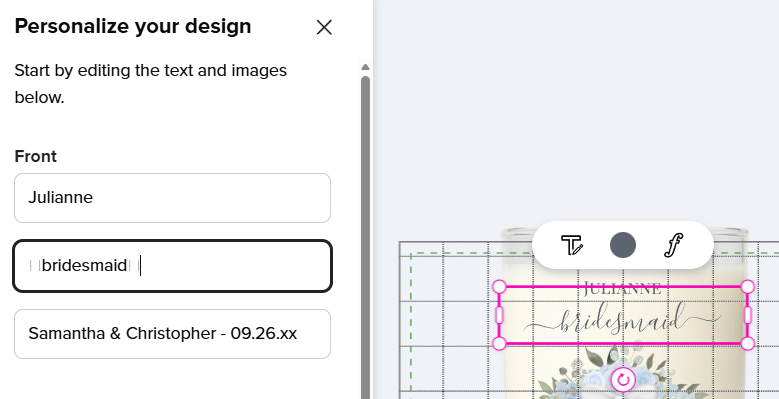
I’m still seeing the box symbol in place of the special character in the text box on the form. BUT, if there’s a space after the special character, the placeholder symbol will disappear. I believe it’s been this way since before the new design tool.
No space after the trailing swash:
With a space after the trailing swash:
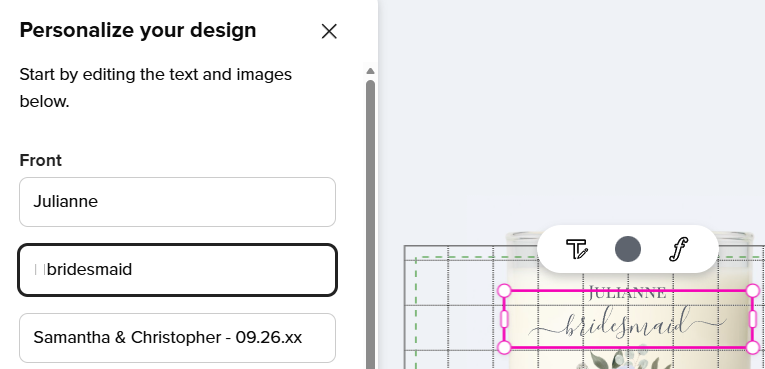
As far as I can tell, putting a space before the leading swash doesn’t remove the symbol, it’s just if you have a space after it.
1 Like
@Cat_Ritchie are you signed in when looking? Because I still can see them when I’m signed in, but I can’t see them signed out.
I can see them either way - at least in Chrome, Firefox, and Edge. Maybe it’s browser specific? Are you on a Mac?
I’m on a Mac Chrome (logged in) when I can see it. And Safari (not logged in) when I cannot.
I don’t have that symbol at all, just a single space where the swash is. If I delete the space, the swash disappears.
I’m on Windows, Chrome.
Thanks for reporting the situation. I’ve passed this along to engineering for review.
2 Likes
Hmmm… I’m using Windows 11. Maybe that’s it?
I’m also on Windows 11, so that’s not it. 