I don’t use the masking tool often anymore, as I have switched to the frames, but there are a few times where I need it. I just realized that I do not have the MASKING option on my toolbar in the NEW design tool, although another designer I know showed me a screenshot of hers and she has it. I tried to find a way to contact Zazzle to see if I could have it added to my design tool, but it’s become impossible to contact them as a creator! The Zee chat assumes I’m a customer and gives me non-related responses no matter how I word the question; and there’s no email or phone number anymore on the help page. How can I get it added to my Design Tool???
1 Like
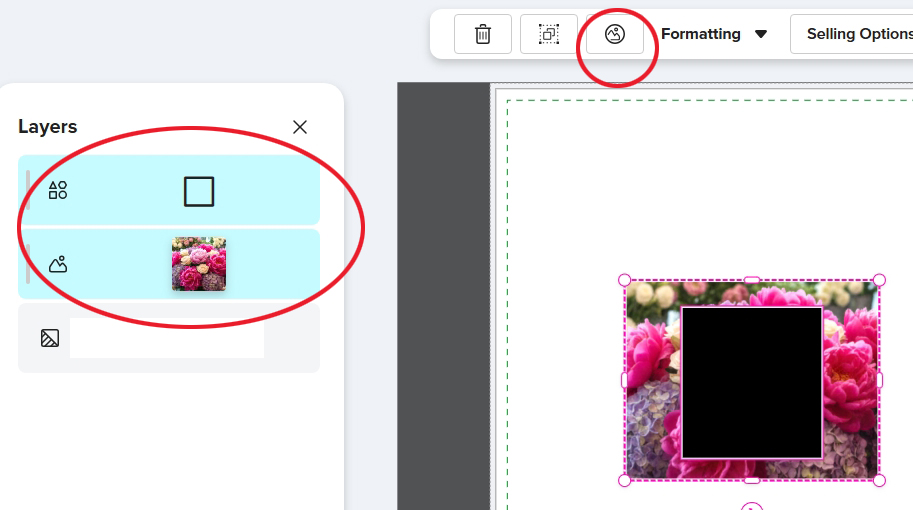
You might already know this, but I’ve found that the “Mask” icon only appears in the toolbar when both the image and the mask shape are selected together.
4 Likes
It took a couple of times selecting both layers (the image and the SVG) but it finally appeared! Thanks!!
3 Likes
you are amazing – I’ve not seen that explained anywhere else and it possibly just could be labeled so that the rest of the world could find it.
2 Likes
I am finding there is no way to unmask a design in the design tool, that was created in the old design tool.
2 Likes
Yes, I have the same problem.
1 Like
@smkshops I’m having the same issue with designs created in both the new and old design tool! Designs initially allow masking and unmasking, but then automatically turn into ‘Frames’. I’m not sure if this occurs after publishing. I could be wrong, but I thought it had been happening for a while now.
Are you able to unmask ‘published’ designs created in the new design tool?
1 Like
No, not at all. It’s like they are frozen or locked. But even moreso, I can’t create masked designs in the new tool. I don’t see a mask/unmask option.
@smkshops It only appears for me when _ both the image and mask shape are selected together._ The top toolbar changes and it appears. I’m using a PC, so it could be different on other devices. 🤔
1 Like