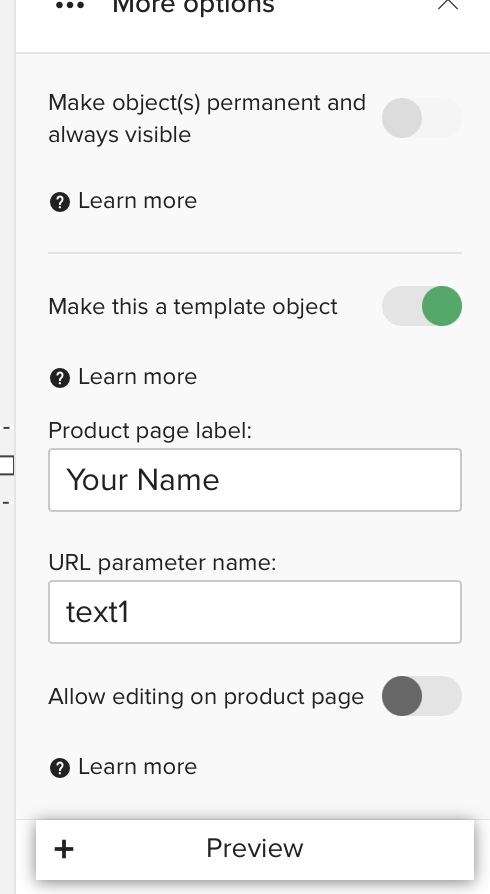
I’m sorry to hear you’re experiencing an issue here. It looks like the “Make product a template?” option in the publishing menu was selected to “no” when initially posting the product for sale which may be preventing the personalize it templates appearing in this instance.
When you are designing the product there’s a setting to make text or images template. You did this part properly. Then, once you publish the product, the publishing page has a few settings towards the bottom of the page. One of these options is “Make this product a template” and you selected “No” (the default is Yes).
A few mins ago I published this same product for you (but with the aforementioned template setting set properly) and it should be good to go. It’s set to Direct-only, so not visible to the public unless you change that part. It should be easy for you to find in your store since it was just published.
Not sure if this will help—-Your Name , or whatever text you want in your template text. When I looked at your product, it should have two lines in the text template box in the left column whew layers are. You only have one. The second one would let you know that you went to “make this a template object” and activated it, and entered “your name” in the “product page label” box. @Padraig you rock.
Scott - thank you so much for this.
It’s a complete mystery as to how/when the button was turned off. I’ve been doing this a while and never touch the default setting of that button. In fact, there were 4 designs on cards like this that I discovered had been turned off. When I checked I did think/hope that the button could be activated from the Edit Details section but as you know, I’ve had to create a new design.
I wondered why they hadn’t sold but had lots of views. Thank You.