I noticed when trying to design items today that recent images is not updating to show the most recent images being used in the designs to make it easier to get back to the most recent images that have been used. I like to create a design and then go back to recent images to get the image I last used and either delete it if I won’t need it again or start a new design from the images I most recently used and now it’s not updating so I have to really go back into the archives and try to search for the image instead of it showing up in the recent images list.
6 Likes
Happening to me too. The “most recent” image in my list is from something I was working on 10/29 if that helps with troubleshooting.
5 Likes
Me too. Kind of annoying since I too use it to grab recent elements in a series creation mode.
4 Likes
Since then I had one more photo show up in my recent images, one that I was using on the 9th. But I’ve used dozens of other images during this time that aren’t mixed in there …
1 Like
I’m sure that this glitch is a low priority at the moment, considering the time of year and the amount of gremlins that can cause havoc on a system as large and complex as Zazzle, so I will patiently await a fix and know that customers are first this time of year.
This still seems to be an issue with non of my recent images used actually showing up when I filter by recent images. I have mostly given up on trying to create new products as it causes such a headache trying to scroll through trying to find the image I need if it is several pages back in the images.
2 Likes
Hi Zazzle, mostly just bumping this because people are reporting this issue still exists (and it still exists for me also) in https://community.zazzle.com/t5/technical-issues/old-images-suddenly-appearing-under-recent-media-in-my-images-is/m-p/231451. I’m sure you’re busy with the holidays but hopefully it can be looked at soon!
2 Likes
Yesterdayish I noticed one new photo in my recent photos but I can’t narrow it down to a specific day (it’s one I’ve been using a lot lately) and it’s certainly not the only image I’ve used this week. Mostly just noting that things are apparently still changing.
1 Like
Another month later and this is still an issue.
Bumping this up as this is still an ongoing issue months later. Thank you.
I’ve seen more images show up in my recent images lately, but not consistently so I haven’t really been relying on it because it maybe only has half or less of the images I’ve used lately, and they aren’t showing up in there right away (i don’t think? but like I said, I’m not checking there regularly because I can’t rely on it)
1 Like
I keep forgetting to update this thread but I had a realization the other day that might help with troubleshooting this.
I almost exclusively edit old products as templates as part of my workflow so I’m using the “Change Image” 99.9% of the time. Obviously there is also the “Add Image” button. I think when this “broke”, it stopped counting images selected with the “Change Image” menu and is only considering ones from “Add Image”. This explains why occasionally, very rarely, I see something new show up there.
Zazzle, does this explain and help troubleshoot?
1 Like
I see the text in the menu changed from “Recently Used” to “Recently Uploaded” (which I’m not sure how that will be different than “All Uploads”. This makes me think they are not going to fix it? Sorry 
(Zazzle, please feel free to explain what is actually going on …)
This is still a problem. I’m guessing that they’re just not indexing it for a few days, but it really makes the feature useless. For example, today I’m working on a collection that uses the same artwork. I can go search for the artwork in my uploads, but it’s buried in a variety of different folders so it takes me 5-10 minutes to find it all. The way it used to work, each time I used an image it would appear at the top of the recently used folder, But now it doesn’t show up as recently used for several days. So my choices are to either make one product and then wait several days to make all of the matching stuff, or to search for all of the artwork over and over and over. I’m super disappointed with this change because the recently used images feature was probably the most useful thing about media manager, and now it’s disabled to the point of being pretty much useless.
@Cat Can you not copy the images that you need in a temp sub folder/album and name it 00000Tempforcollection - that way it’ll appear at the top of your list in My Albums.
1 Like
Well, that’s an interesting workaround. Seems like a lot of work for something that used to be easy though… (I can’t actually remember how to make folders or move images around, but perhaps I’ll have to refresh my memory!)
@Cat Search for your images, then press the little “i” button in the bottom right of an image and press blue “add to album” button. You’ll get another pop up where you can create a new album.
edited to add - no need - you can search for recently used in the dropdown (top right) as it used to be
reccently used image dropdown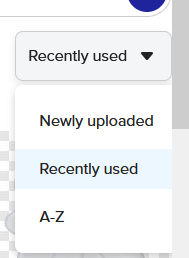
1 Like