Kind of relieved to see this thread. When I could no longer see the Replace option, thought I was on the “naughty” list.
4 Likes
sammmmmmeeeeeee. I honestly find it very unfair that some users have it and others don’t.  And it doesn’t even seem to be determined by level as some newer sellers seem to have it.
2 Likes
I just posted about this. It’s really a hassle not to have the replace option.
1 Like
Moderators, please answer two questions:
-
Why has the Replace feature suddenly been deactivated?
-
Why do only some designers get access to this feature?
As a user who has never been able to access to this feature, I deserve an answer to my long-standing question.
All Zazzle designers deserve advanced communications regarding upcoming changes like this, all designers deserve equal access to design tool features, and all designers deserve transparency from Zazzle.
14 Likes
100%!!!
3 Likes
Hi all, Thanks for your patience while we looked in to this. I can confirm that we have paused this feature until the New Year due to prioritizing more pressing reviews over the Holiday period. We expect to bring it back online from the week starting of the 6th of January. Thanks so much and apologies for the delay in communicating this.
13 Likes
Thanks so much for the update, James – I very much appreciate it!
1 Like
How about for the rest of us that you have not given the benefit and equal playing field of having this feature???
6 Likes
Yes, James, you did not answer that question. Please respond again with an answer.
5 Likes
Please, we all need this feature as losing all the stats by recreating an old item that needs little fixes, is very hard to gain again
4 Likes
Thanks 💞 I presumed this was the case so very glad it will return next year phew! I shall simply add the links into a database to return to them in the New Year.
I hope you and the team at Zazzle have a wonderful Christmas and New Year 
This is not good for all of us wishing to make adjustments for customers. I just lost a sale due to it. They don’t want to make their own changes and I don’t want to create a new listing.
1 Like
If you’re just making an adjustment for a particular customer, you don’t need the replace feature. Just make the change and then send them a “work in progress” link from the share dialog. In other words, make the change, then click on the arrow symbol in the upper corner of the preview image on the product page.
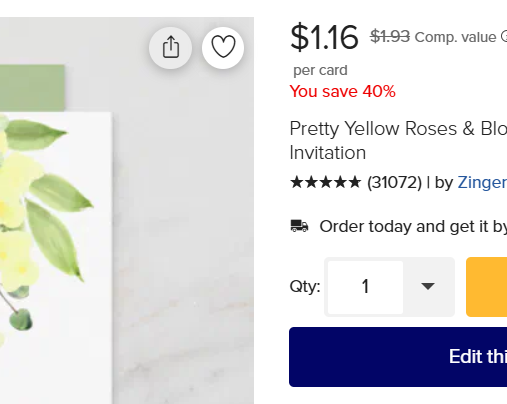
That will bring up the dialog box with options to share on social media etc. Choose “copy link” and send it to them. That will allow them to access the new version without you having to publish it. They can customize and order from there and it will register as a purchase on the original product.
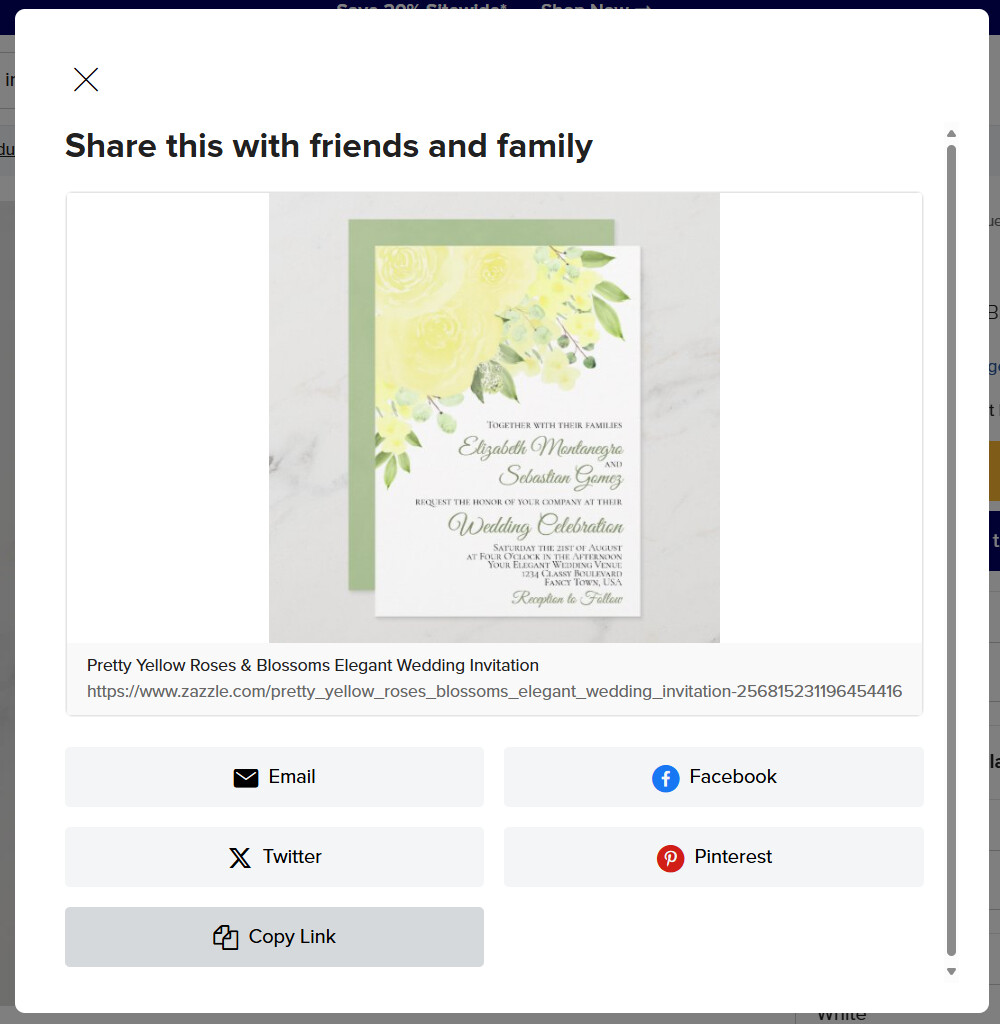
This only works if you start from a published design where it says “by your-store-name” on the product page. If you start from scratch you won’t get credit for the sale.
7 Likes
@James can we please get an explanation as to when the rest of us will be getting the replace feature? This is truly unfair that the rest of us designers do not have the same resources as others. Or at least some kind of explanation as to what one has to do to qualify to receive it.
6 Likes
I agree. I"ve never had this feature and I’ve been a bronze level designer for YEARS. I"d like an explanation, too.
2 Likes
Maybe it’s just me, but the option is no longer available; yesterday it was working fine.
It comes and goes on my products. Makes it look like a testing phase, and is so unreliable I just don’t take it into account.
1 Like
I had this option for several months and suddenly it’s gone
I’d like to further point out to the Zazzle team that it’s really a pain to have to re-publish a product to the market place just to make fix something or freshen a sample photo or do any sort of update on an already published product. Imagine, if you in your office had to do that everyday—what if you had to come to work everyday and in order to change something you already submitted yesterday, you must completely redo it and resubmit all that work all over again as if you never submitted it the day before and whatever was submitted yesterday counts for nothing.
2 Likes