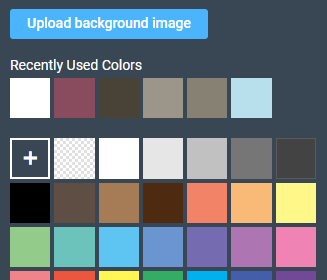
Would love to be able to save a custom palette for background colors (like you can in Canva) instead of being able to only access the last 6 most recently used. I spent a lot of time finding the hex codes for a particular palette (like Pantone Spring/Summer 2022…) and would love to be able to easily access those colors/shades without having to rely on my handwritten cheat sheet once I get past 6 or 7 colors. (Also open to other creators’ advise as to how they handle similar issues - TIA 
36 Likes
Hi @angelafuller729 ,
Thank you very much for the suggestion. I can see how this might make things more efficient for you and our creators. I’ll pass this along to our team for review.
All the very best 
Pádraig.
Brilliant idea! Great for customers too.
This would be great for text colors too… I suggested it years ago.
My own personal workaround is a simple text document that I keep open when I’m working. It has hex codes for all of the colors I use frequently, along with my boilerplate responses for common customer questions.
Oh my gosh it would be a dream come true to be able to save our own color palettes. The customizer has come a very long way since I started and I’m so grateful for all the improvements - but that is definitely the top of my wish list now! (a few new fonts a very close second)
I create a palette in Gimp then screenshot it and upload it to my design as a temporary layer. That way I can use the eyedropper to pick up colors from it and delete the layer when I am finished.
@shellifitz Brilliant. Once I saw your comment I realized I had saved several palettes on Pinterest, making it so easy to upload them in jpg to my Zazzle images.
@angelafuller729 I am glad that helped!
I will just add that I think it would be amazing if we could create palettes in the design tool also. It would save alot of work and make the process so much easier.
That is a great idea.