I am finding it so frustrating to try to find items I want to design. When I put a term in the search window, I only get a general list. For instance when I search for “duffle bag” (a new Zazzle item), I get t-shirts, stickers, mugs, etc. Or I’m asked to choose a category that is nowhere close to what I would expect duffle bags to be in.
How do I find the things I want to create??? Please explain this to me like a four year old, because I’m at a loss.
When I put in “duffle bag” I’m taken to an overall list of items. However, I tried “duffel bag” and it worked. I think the algorithm is a bit wonky, but I’m there now. Thanks of your response.
You can also use the Zazzle Site Map. As long as you’re picking a product type (i.e. “Hats & Caps”) and not a theme (i.e. “Retirement Party Invitations”) the CYO blanks for that product type will be at top of the page.
Be cautious using the general marketplace search to find blanks. There are lots of products that look like Zazzle CYO but aren’t.
I agree with this completely. Some products pop up right away, while others (sometimes newer ones, I think?) I have to find the “magic words.” lol
This can be frustrating because if I’m trying to use “transfer design” and I stray too far from that search bar, it seems like the design then evaporates into thin air and doesn’t autopopulate on the product!
I think it’s suddenly gotten worse. I went to transfer a card design to a foil card. I searched “foil,” like I’ve done a lot in the past and that used to get just the foil products (cards and tags mostly). But this time, there were a whole slew of unrelated non-foil products - 2,066 results. I searched with a more specific “foil card” and got 106 results - and the actual folded foil greeting card was the very last result.
I work on a windows laptop and can tell you that every time I find a blank product I plan to use again I save it as a bookmark in the bookmark bar. I also have my bookmark bar bookmarks in alpha order so I can easily find the bookmark I’m looking for in the future… it saves me a LOT of time especially for those hard to find blanks that the search box is finding it difficult to seek.
@WBartworks to find desk mats use the search term ‘mousepad’ and for the air fresheners, you have to drill down into Home & Living >Garage & Automotive Accessories > Interior Car Accessories for the blank
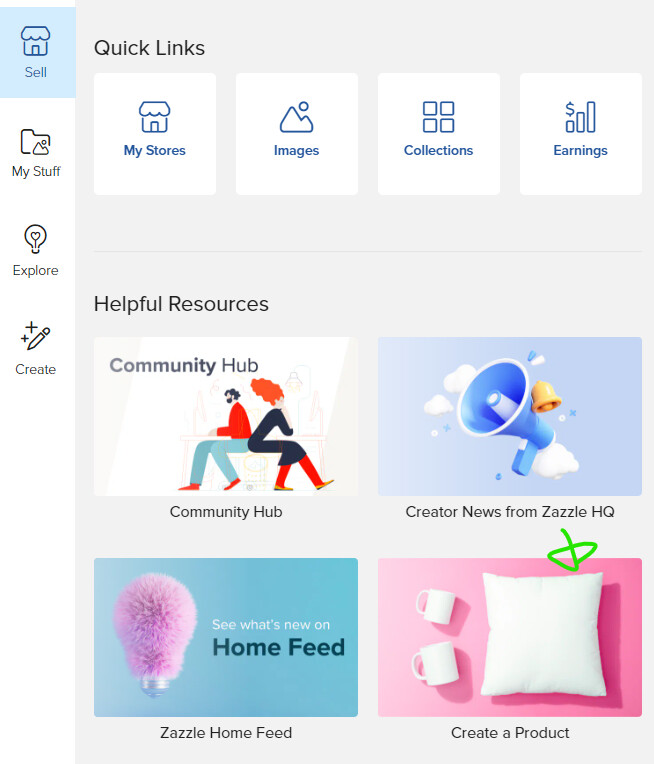
Thanks for this!! I gave up using the sidebar, which used to be my favorite method of getting to creating new products. The link for blanks used to be in the Create tab - the obvious place for it.
Now it’s just a few selected items, rather than the list with search bar. So it appears they’ve moved it to the Sell tab under Create a Product.
Thanks again. I’d never have thought to look there for it.
Kinda related, as I noticed Zazzlers selling espadrilles, maybe a year ago or something. I was working on patterns for a little while, but couldn’t find blank espadrilles. Just flip-flops. Does anybody know if espadrilles are still available on Zazzle?
I noticed there are some where you can “Personalize existing designs” but doesn’t that mean they get part of our royalty or something like that? Not sure. I’d rather just start from a blank and get my full 10%. Anyway, I just moved onto other stuff instead.
But it would be interesting to know if the blank ones are hidden away somewhere.
They do still have them but you have to apply to design on them and be approved as they have some special characteristics to them. Here is the link to apply: