It really depends on what kind of data you are trying to keep organized and how searchable and sortable you want it to be.
Excel (& other spreadsheets programs - I use the free WPS Office) are great. I love whipping up little spreadsheets to track things and do all the calculating for me. But they are designed for dealing with numbers whether it’s tracking sales data or figuring payroll or making custom invoices. I’d use Excel for working with the .cvs files you can download from your Earnings pages. But if you’re trying to compile other kinds of information in one place, there are better tools designed for that kind of thing.
Trello is wonderful for what it is primarily designed for - list making. I used it in my past life as a home improvement contractor. I could set up cards per room with lists of what needed to be done there and then both us and the customer could access them, edit, check-off, move to Done, add notes etc… It was great for that purpose but seems like it would be rather unwieldy as an all-purpose data storage & organizing tool.
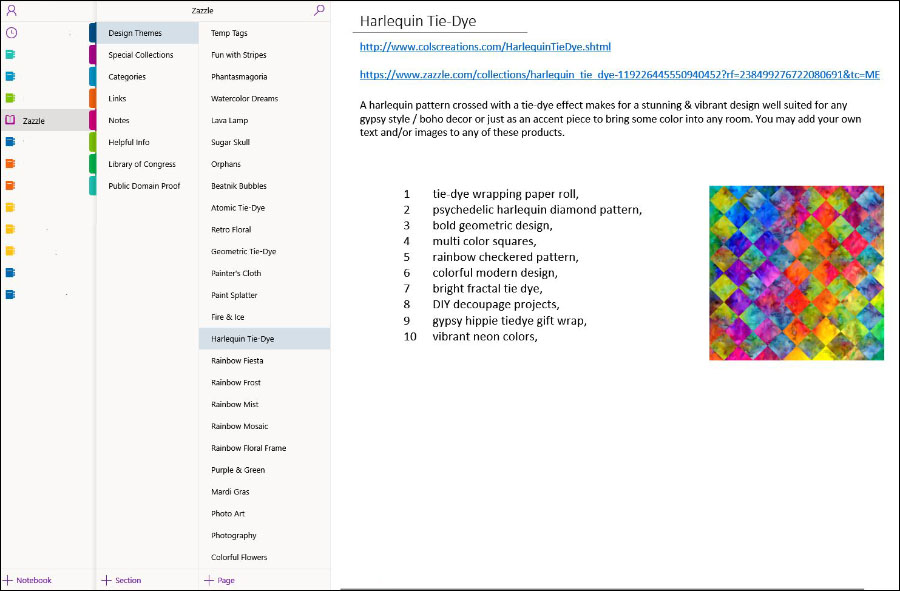
OneNote is fabulous! I use it every day for all kinds of things in my life including Zazzle. As @KeegansCreation said, you make Notebooks which contain Sections which contain Pages. You add your content to Pages and best thing to me is, you are not constrained by any grid or line system, you can drag & drop content anywhere you want including images, which you can easily size by dragging the corners.
You can set up your OneNote structure in whatever way best suits the way your mind works. For me, this one easy-to-navigate app replaces what would otherwise be countless individual .txt and .doc etc files.
I love OneNote for general info. But for searching and sorting more, uhm, detailed data, I go to database programs. I bought a lifetime license to SpeedBase years ago when I needed to create a complicated db system for a business I was involved with. It’s a powerhouse and the owner/programmer was always quick to respond to my SOS emails, LOL. For simpler needs that arose later I installed the free MobiDB Database and liked it so much I bought the paid version. (It looks now like it’s moved to a subscription model where you pay annually.)
Both of these let you build a custom database from scratch, you’re not stuck with templates that don’t fit your needs. The thing with databases though is that what you get out of them is only as good as what you put in to them. This means you really have to pre-think your fields before creating them, have a master plan so to speak, and be very consistent in how you enter data in said fields. IMO the primary function of a db is to find and sort info. So if you were to set one up for Zazzle you could say, OK, I want to see all products I set at 13% royalty, or I want to see all products I used x design on, or I want to see all latte mugs I’ve made or I want to see all products I’ve Pinned … Then from there you can sort the results by whatever criteria you choose. Db’s are an amazing tool because you can view individual records storing however much detailed info you want to include in them, but you also have the main table list view for searching, sorting & filtering by whatever field(s) you’re interested in.
For an existing store with hundreds or thousands of products, building a db and then going back and entering the data for all those products would take a ridiculous amount of time. But for new stores, it would be easy, adding the data for new products to your DB would be just one extra step in your workflow when publishing.
So my tip for staying organized is - first decide what kind of information it is you want to gather in one place and what it is you want to do with that information once gathered. Then you can decide what the right tool for the job is.