Template Text not Showing Up under Personalize This

I keep getting this problem where every line that I set as a template object doesn’t show up in personalize this. It has happened with multiple products.

An example, this one has the “Providing Marriage and Family Therapy” as a customizable tagline in the design tool, but it doesn’t show up under personalize this on the sale page.

LMFT Licensed Marriage and Family Therapist Busine Business Card | Zazzle

Thanks for your attention.

@Es1  

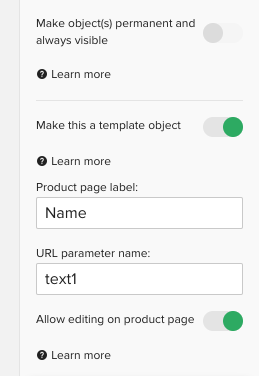
Take a look at “URL parameter name:” and make sure that it is different than any other text template field…

Also check that you did not make the object permanent or accidentally lock the layer…

My guess would be the first one… but I can’t see those details when I go into the design tool on that product…

PC

I had a customer contact me recently re no template fields showing and the template is exactly as it should be, she transferred the design so not sure if this is what caused the issue @Scott  

1 Like

@Es1  Have a look to see if you’ve got the ‘Allow editing on product page’ checked also

For this particular text object you’ve disallowed editing on product page.

Go to the design tool and select that line of text. Then on the right side find the option called “Allow editing on product page.” You’ll notice this option is disabled. Enable it, and then republish the product.
Hi I didnt do that, transfer seems to have affected the visible templates in details

I was responding to the original poster.

I know that Scott, I’m just letting you know as per my earlier post, there remains a technical issue re this.

https://www.zazzle.com/cute_sea_turtle_watercolor_ocean_life_add_name_travel_mug-168342519569326702

See my messages re customer query

Thanks. Never noticed that!

The template text looks right to me. I could edit all fields.