Sorry all I make one more note here:
For days or even weeks now, it seems like we’ve all had this new tab on the left in the backend under “Products” – something like “Templates, Images, Digital Assets” – if you’ve been paying attention.
As of today, the tab is still there, but it no longer shows any templates. It was still showing them this morning.
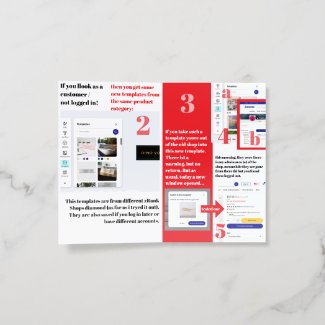
When you visit a shop as a regular customer and need to personalize something, you see the tool again. From what I can tell, it probably shows templates from across Zazzle (I’m not 100% sure) – popular ones from a specific product category.
I’ve clicked around so much now that I’ve noticed they’re mostly from high‑rank shops, but not exclusively. Friends have found their own templates there.
At the very bottom of the sitemap there’s a section called “Maker” – the last paragraph – with lots of landing pages I hadn’t noticed before. Those also contain templates. I don’t know if they’re the same ones or if there’s a connection, but the “Images” from there seem to be the same ones customers see.
What I really want to know is: what do I get out of these templates appearing in my shop? As far as I can tell, you can’t turn them off. And from my tests, when a customer switches templates, they’re effectively kicked out of your shop. New windows keep opening, which is already driving this experienced Zazzler crazy. I can only hope customers can deal with it, because each new window makes the site slower, and for two products I tested, the preview didn’t even load anymore.
I suspect they just forgot to tell us something – whatever that “something” may be.
I really appreciate all the work that goes into new features, but I have to be honest: it’s extremely demoralizing to invest so much time here over months and then suddenly see a feature like this appear without any explanation at all. It truly feels like a hard punch to the gut. The tool itself may be great, but the lack of clear communication has become so confusing that it’s simply unbearable right now. Good luck as all, I shut off my computer and leave until some clear informations will appear. You’ve really done me in Zazzle.