Hello! I just had a little heart attack while revising my Christmas card designs and noticed that in one collection, all my green plaid cards have red templates! So the first thing I did was edit the design info and replace the cover photos. However, I wonder if that could be fixed? And worry that more products could be affected (I am yet to check that out). Has anyone noticed anything like that? The cards were quite old and I remembre changing the original red color template to green using the Zazzle design tool.
you can see it here: Red Plaid Elegant Custom Two Photo Christmas Holiday Card | Zazzle
it seems like in design tool the color is still green…
I will report this now, thank you!
Looks like you may have added the green image yourself. If you follow the link in your post above and then open the Product Media Manager (it’s a link above the main product image) you’ll see the green product image. Click the three dots in the upper right of the image, then select Delete to remove it.
Hi Scott, unfortunately, this case isn´t that simple;) As I mentioned in the first message, when I noticed the problem, I hastily changed the description of the products and cover images to red, so the clients wouldn´t be fooled. And I left the previous cover photo with the green color of the frame as a second to know which one I should replace. However, I noticed that when I click on the background image template in the design tool, the colors still show as green, not red. Please see the attached image (the three dots are green). So I have no idea why the product templates appear red in the first place. And I would worry that when the client buys them as red, they would be printed green!
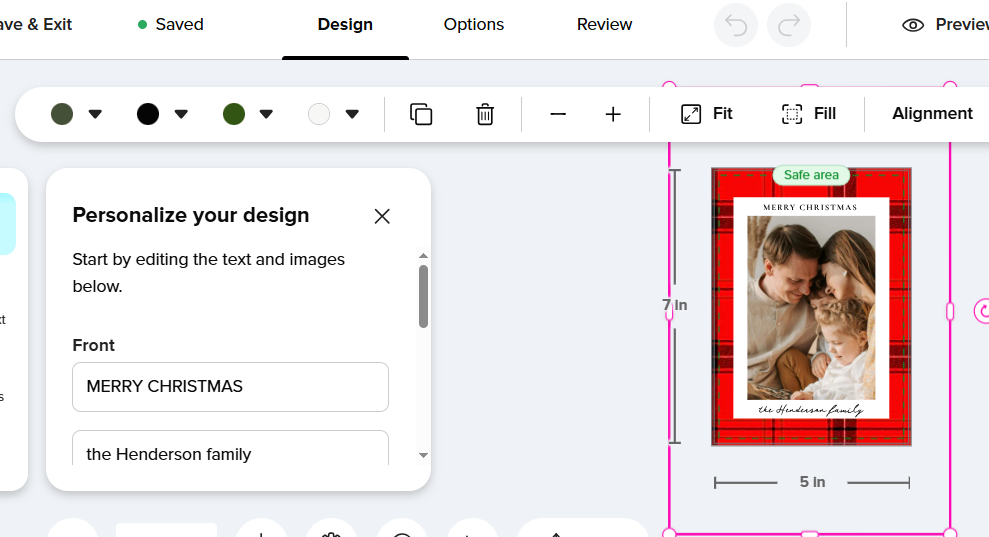
P.S. If you look in my collection, you will see that even the originally red frame products (the dark red ones) have changed… Now all the templates are bright red. Login to your Zazzle Account
Hi Scott, any update on the bug? Please read my last comments, where I explain the issue in detail. Thank you!
I will check in with the team here, thanks!