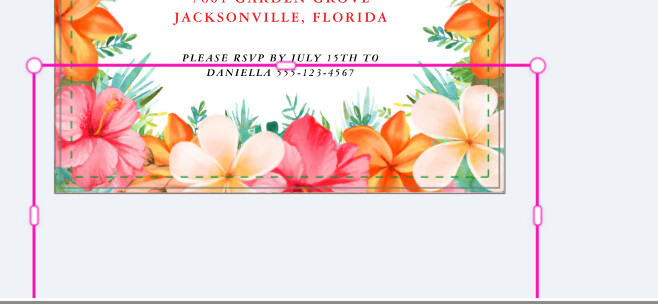
I’m having trouble selecting single layers to copy or move. When I try to select a layer, if there are other layers close, it will jump and select a nearby layer instead. For instance, If I’m designing a floral border (see photos below) and want to move just a piece of fern that is in the back, I can’t select the fern unless I go to “Layers” and select the fern from there. Then when I try to click on the selected fern, the design tool jumps forward and selects the flowers in front of the fern instead. It is very hard to grab the specific layer I want if there is more than one layer in that area. I have to completely pull the layer I want all the way off the design to be able to adjust it or copy/paste it. This happens all the time on every card I work on, new designs or editing a previously posted design, not just one specific card. This happens on both Edge and Chrome since the design tool re-design. Is there something I can do on my end?
Fern selected in the background Selection box jumps, can’t access fern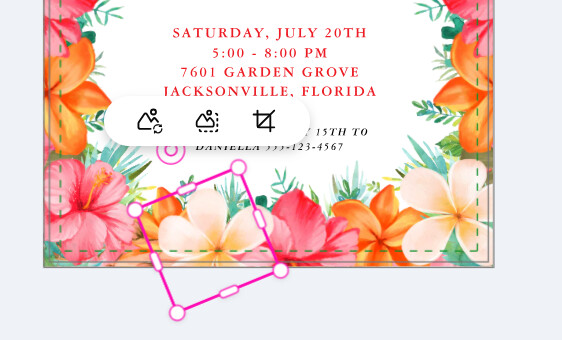
4 Likes
To move the fern, you can temporarily lock the elements above it in “Layers”. Once you’re done, just unlock them.
1 Like
I have been having this issue lately as well.
3 Likes
Good idea, but hopefully not our long-term solution . . .
2 Likes
Locking the layers would be fine if there were just a few layers. But this would be very time-consuming if you had to go through many layers to identify the problem ones, lock them so you could move just one tiny piece of art, edit the design, then go back and unlock the layers. We used to be able to hold the cursor over the layers and all the layers in that area were shown, then you could grab just the one you wanted and adjust it. Used to be very fast, without constant fiddling.
1 Like