I noticed last week that when I create a new Postcard I’m getting a size/resolution warning every single time. Even when the image is huge and resolution is 600 dpi, so there should be no problems with low resolution. So far, I’ve been able to ignore the warning and still create, but if I were a newbie, I’d abandon the process on the spot, thinking I had somehow screwed it up. Any workarounds or suggestions on this issue?
2 Likes
Are you sure the warnings are related to low resolution? There are new warnings for image placement (details in this thread: Text & Border Warnings on CYO Products - Zazzle) Perhaps that’s what you’re seeing?
2 Likes
Maybe if Zazzle gets enough complaints about it, they’ll get rid of that “feature.” It’s highly annoying, and even though they said it doesn’t show for the customer, it actually DOES, on certain products.
3 Likes
Can you link me to a product that exhibits this issue?
I am having the exact same issue!
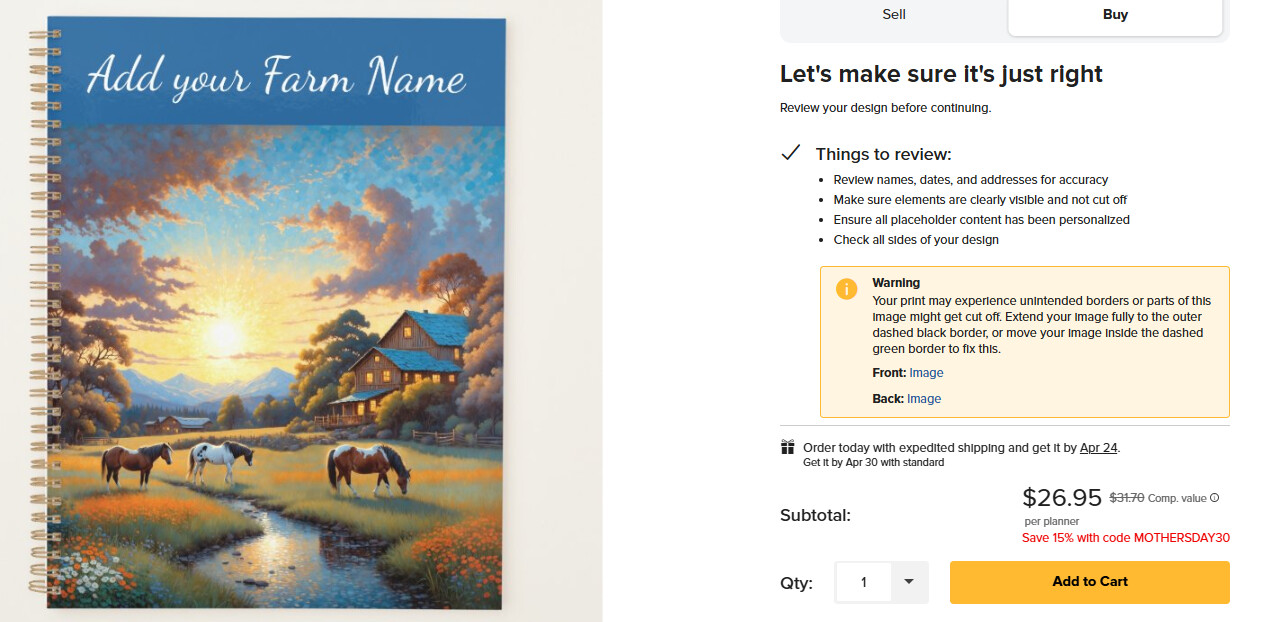
I started getting these warnings this morning. I have made a lot of garden flags and planners, notebooks, where I use a background color. Yes, I know the image is not to the edges, because I have a background color. The warnings are now showing to existing designs of mine. I did some puzzles this morning with no warnings, then all of a sudden on the flags, they started showing up. Tried notebooks and the warning shows up too. Big yellow warning with !!. No one is going to buy these.
https://www.zazzle.com/horses_on_farm_wildflower_meadow_planner-256724773116084493
Warning
Your print may experience unintended borders or parts of this image might get cut off. Extend your image fully to the outer dashed black border, or move your image inside the dashed green border to fix this.
Front: ImageClick to fix this issue
Back: ImageClick to fix this issue