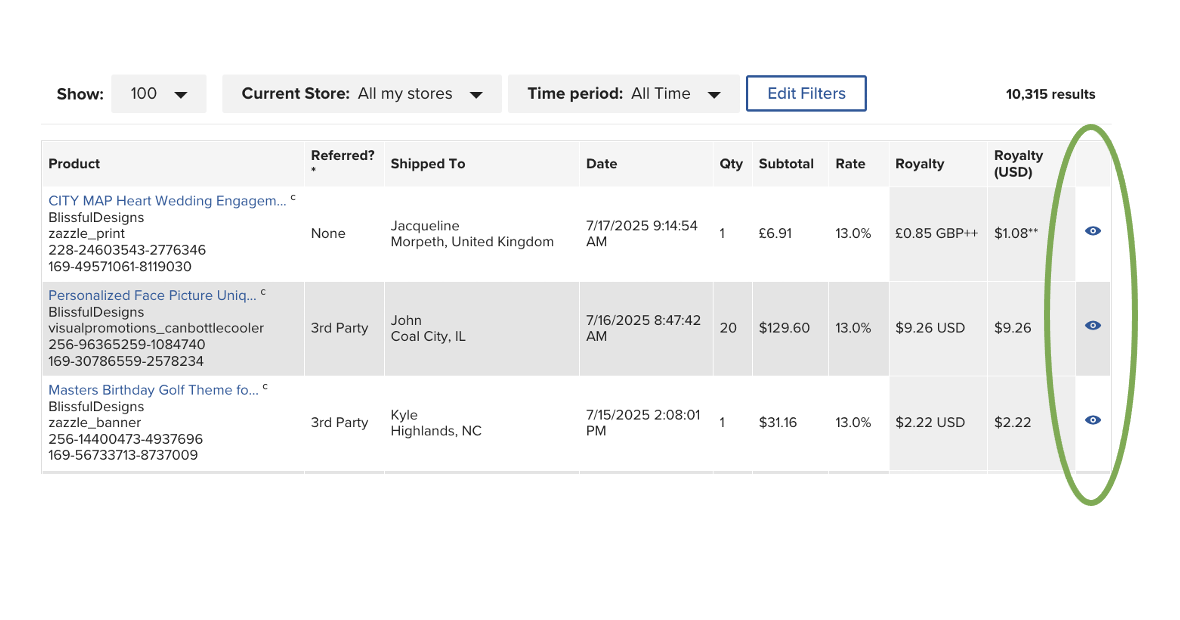
We’ve made some changes to the Earnings section of your Account to improve transparency and to make it easier to understand how your Earnings are calculated.
The new Transaction Details Page brings all key information into one place, giving you a clearer view of what goes into each sale. You can access the transaction details page by visiting your Earnings history, Royalty history, or Referral history pages and clicking on the little eye icon in the right column. The transaction details pages will be available for Royalty and Referral transactions.
Here’s a quick look at some highlights of what’s included on the Transaction Details Page:
Published Product Details – All the key info about your Product.
Order Item Details – See when the Product was ordered, where it was sold, the Product type purchased, if it was a Referral Sale, and more.
Royalty Breakdown – Detailed information on how Royalties are calculated: Upcharge Royalties, Marketing Royalty Fees, Secondary Content involvement, Excess Royalty Fees, etc.
Earnings Summary – Includes the total Earnings for that transaction, including a breakdown of Royalties, Secondary Content Royalty Share, Referral Commissions earned, and more.
Quick Links – Share, edit, or transfer your design with ease and more.
Customer Details – View the customer’s name and location.
Some important things to note:
All sales prior to 4/1/25 will be on the old Earnings reporting system, so it won’t have the Royalty breakdown.
More changes are coming, but this should give you more clarity on how Earnings are calculated.
We’ve removed the rate column from the Referral history page. You can find more details about your referral in the Transaction details pages.
Your feedback has directly influenced these updates, and we encourage you all to keep submitting your questions and feedback to us. To help us track and respond to your input more efficiently, please use the form for all questions, feedback, and technical issues. While we’ll continue monitoring this thread, the form is our primary tool for managing feedback at scale.
With everything we have gone through these last few months .. Im sure I speak for many .. waiting for this roll out .. you left the most important thing we all wanted to see.. the origin of the sales .. where did the 3rd party sale come from .. where did the customer click a link that brought them to our page .. this alone could help boost sales , please add this to the stats .. while the rest of 5hem are interesting, they don’t really help anyone improve or learn where to focus attention ..
Yes, definitely a welcome addition. Thank you. I do agree with Deb that it would be interesting to see whatever detail could be provided about the third party sale (even if only to say it was Zazzle’s promotion efforts, or an external non-Zazzle referrer (I would expect you can’t be more specific than that). What I would also find most informative, when I manage to refer something myself, is what platform that referal came in from so that I can tell where my efforts are paying off most.
I agree with Deb - the breakdowns are nice but they don’t answer the big question many designers are trying to figure out - the 3rd party information. I could be wrong but I think what a lot of designers want to know is how many of those 3rd party sales are Zazzle referred. While it would be nice to know what link and where it was clicked, (whether an email from Z, for one example or just typing Zazzle into the browser and landing on the main page for another) even designating that Zazzle is the 3rd party would be a great start.
Please tell us where the 3rd pary sales are coming from. We very rarely see “none refered” since the new ambassador program. We had about 30% of “none sales” before the changes. Now it’s under 10%.
And we would also love to get some insight on canecellations espeically the ones that are on the same day.
The Ambassador Program is built around the concept of referral sales. We need to know where the referral sales are coming from. Royalties for me are halved now, as against before the start of the Ambassador program. I am sure all the creators want to put in more effort to increase sales. Without Zazzle’s support in guiding the promotion of enhanced referral sales, the sales and royalties will continue to decrease for creators like me. Future enhancements in reports must help creators. If possible, a new referral guide may be developed. Creators and Zazzle should grow TOGETHER and not one or the other..
And so now, all I have to do is click each and every single eye to open up a detailed report. Gee thanks. No, I can’t pull a report from this. No, that’s not time consuming. Oh thank you for this, and for allowing us to get the details easily and fast without running into more slow configurations because we don’t have enough to do. 😶
I have two zazzle stores with huge number of jaw-dropping,fabulous products but views are not happening let alone sales. I cannot understand the problems. can anybody solve it ?