I can’t seem to change the color of text today. It will do one line of text only. Normally when I put in the hex code, it change the color, but then saves the color in the palette picker (recent only). but this morning it’s not saving it at all and not even adding the hex with each line of text is working for me.
8 Likes
I’m having issues with the edit text box itself today ! When I try to paste a glyph , it opens a whole new text layer with the pasted character separately ! also when I open the edit text box and paste anything there, either to replace an already existing sentence or creating a new one , nothing appears or changes on the edit text box itself , instead it opens a new text layer in background with the new text I’ve been trying to paste … It works fine when I’m typing directly in text box but copy pasting seems broken 🤔
7 Likes
For more clarification, I was trying to change the text color on an acrylic wedding invitation.
1 Like
Yes, I’m having the same problem!
2 Likes
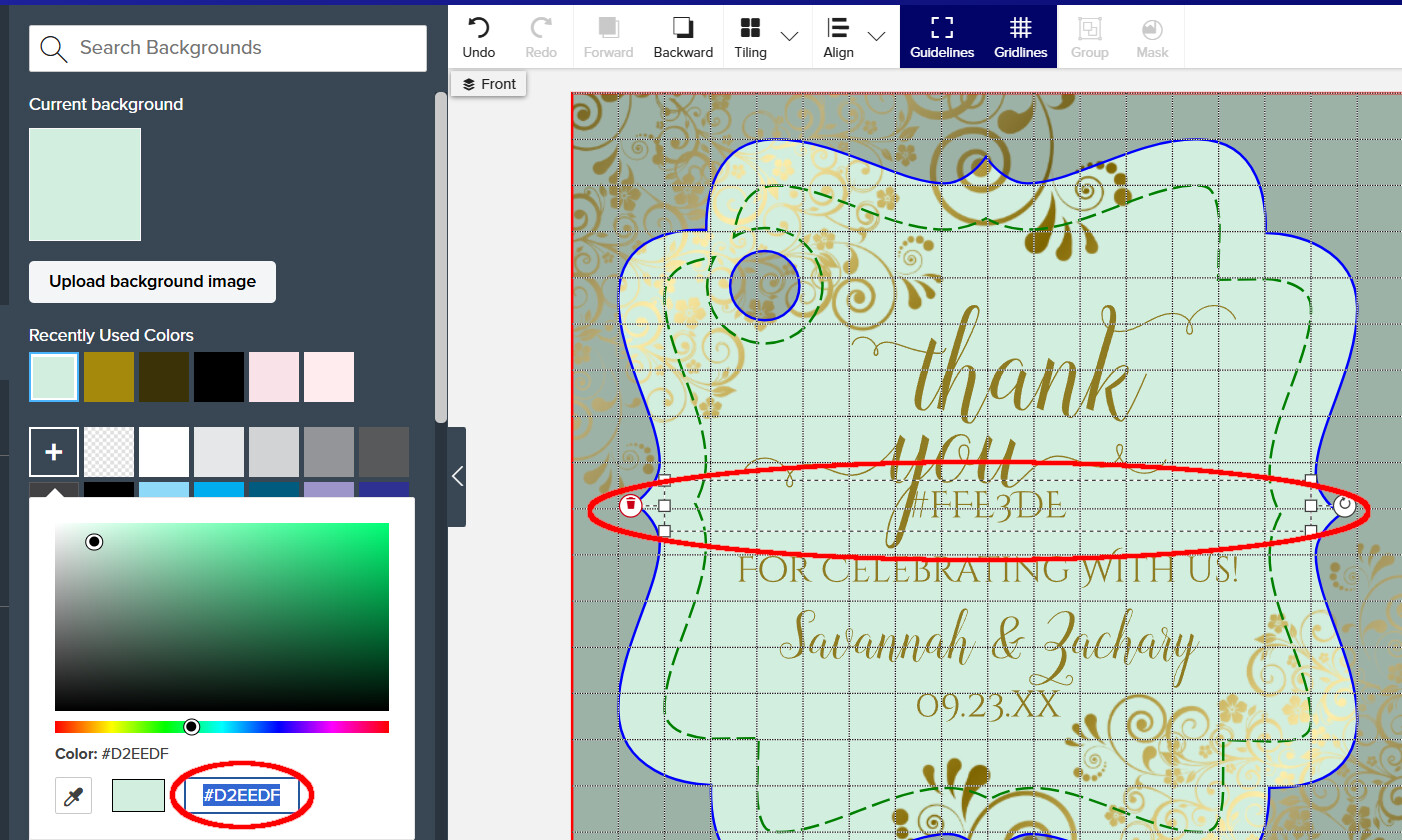
Ha! I was just coming here to report something similar. I was trying to change the background color and when I’d paste the hex code into the background color, instead of changing the color, it would create a new text field with the hex code in it!
Let’s hope this is a short-lived bug!
Guess I’ll go work on promoting or something like that.
ETA: I was able to change the code by typing it in instead of pasting it in. I’m thinking that perhaps they’re trying to introduce a new feature where you can create a text box by just pasting something into the design tool without clicking the thing to add a new text layer first - but now whenever you paste anything anywhere it creates a new text layer instead of pasting whatever it was into whatever field you were using. I tried pasting a number into font size or line spacing and got the same bug.
8 Likes
Never mind… thought there was another bug but it was operator error. Perhaps I’ll just go back to bed now 
1 Like
Ah! I was just coming to report that I can no longer copy paste HEX codes! It’s pasting the art onto the product instead of pasting the code into the little box. Suuuuuper frustrating!
8 Likes
It seems to be even weirder today than it was yesterday - or maybe I’m just noticing this today. Not only can you not paste into any of the controls, you also can’t copy from them. So if you’re trying to grab a color from another product, you can’t copy the hex code to the clipboard. Grrrrr…
6 Likes
I am having an issue with copying and pasting in the design tool
ON THE TEXT SIDE .if you copy your text from your new image that you put below or above that image and try to past it into the edit text label .so if you put on your image in first then the text (fix me please) and want to copy it into the design label it don’t work. anything with the edit text not working for me. can someone go try and see if working for them make a new text the try to past the words into the product page label. don’t work for me in chrome or Edge I clean browser cookies and all so Zazzle must of did a update again yesterday . PLEASE FIX THANKYOU
3 Likes
Copy and paste doesn’t work regardless if you use keyboard shortcuts or use the browser Edit menu. Instead of pasting it into the template field (as an example) it opens up a new text field. However you can edit the template field by manually just typing it out. I assume now the same would work with colors codes (if typed in manually). A bit annoying but possible to work around it.
7 Likes
Thanks!
Yeah, I noticed that too. What a pain.
I have the same problem, I try to paste the hex color for the background, and it comes up as text. I tried typing it, but it only worked once- when I tried to change it, it didn’t work.
I hope they fix this.
2 Likes
I am having an issue with this as well. I can’t copy and paste hex codes or text from the text box.
3 Likes
This should be fixed tomorrow evening. Very sorry for the inconvenience.
8 Likes
I’ve been having the same hex code-turns-into-text problem for the past couple of days.
1 Like
I’m having a similar problem with the text itself in TEXT boxes- I can copy and paste the text box, but not any of the text IN the box! And I can’t copy the text in the box and paste it into a word document, either.
1 Like
I am having the same problem with copying the text and then trying to paste it into the ext template box. I hope they fix this as it’s making products longer.
1 Like
Zazzle has spoken - today’s Creator News:
New Feature: Clipboard Copy-Paste directly into the design tool!
and