I agree ! I miss this ability, too
2 Likes
Thanks,
What a pleasant surprise!! Very nice, well done. Looks clean and modern. Keep up the good work.
Looks so good!
As mentioned above, I’d find it easier to absorb the stats if Created, Modified, and Royalty were maybe just below the Likes.
And I’d LOVE it if a “total royalty earned” stat could show here as well.
Bonus points if that total royalty amount added up royalties from all currencies.
One other thing, I’m not sure if it rolled out with this specific change, but it would be great if there were directional arrows on either side of the large product image that you could use to scroll between all the views. Currently with the larger product photo, even on a good size laptop, you have to scroll down to see that there are other views.
I keep expecting clicking that image to scroll between views, I think because lots of sites are doing that lately instead of the enlargement.
The site is definitely looking pretty slick! 😍
4 Likes
It is awesome! Great job, Zazzle team! It makes creating cover photos soooo much quicker and easier. Last night I wasn’t able to download the back artwork on invitations, but I notice today that it has been fixed so fantastic!! 😍
2 Likes
I miss seeing my stats at the top of the page without having to go to a dropdown menu.
1 Like
Thank you for the extra features such as being able to download the product mockup and artwork images.
Here is my feedback:
I may be in the minority but I much preferred the previous blue version and seeing the stats at a glance. I didn’t realize it was a menu but always thought it was just a quick way to view the stats on the front end. The blue background was easier to see and there was nothing wrong with it. But I do work on a large monitor so screen space isn’t an issue for me.
Having the stats in view was one of the best features when analysing my sales. Now I have to click the link for each product individually after opening the windows. I don’t like the way the flyout covers the image. If you must have the stats in a flyout could you please put the stats in the same order as they are listed in the management area.
It would also be helpful if when we click on the Add to Collection, the collections that the product is already in would show at the very top of the list rather than having to scroll through all the collections to find the tick.
A way of letting us know that the product is already in a collection especially in the back admin area (like the group icon) would be great.
Also if you could please remove that 20% off pop window that I have to keep closing almost everytime I open a product window.
Thank you for this amazing platform.
8 Likes
I ,too, prefer the previous blue version
2 Likes
I think you are saying you can get to the products in your store with just five clicks?
1 Like
This is how I always do it:
Sign In
Click on my Member Icon and choose Saved Designs from the drop down menu.
Choose the Store I want to look at and I’m at All Products for that store.
…
Once I’m working in that store and I want to see All Products I just choose that option from the left menu..
2 Likes
@Gail_K wrote:
It would also be helpful if when we click on the Add to Collection, the collections that the product is already in would show at the very top of the list rather than having to scroll through all the collections to find the tick.
A way of letting us know that the product is already in a collection especially in the back admin area (like the group icon) would be great.
Also if you could please remove that 20% off pop window that I have to keep closing almost everytime I open a product window.
Agree with these ideas. Would love to be able to tell at a glance without clicking anything, minimally, if a product is in a collection. Even more helpful if the collection is listed with the stats.
Wow, that really is a full five clicks to get to products. I see now the left menu, which I had never used. I guess that’s useful to get you back to the default view of All Products when you are on a different page of the products.
I think the idea of restoring the top of the page link to All Products makes even more sense now that I know Zazzle Creators are using a full five clicks to get to the products they need to sort through in order to begin work.
1 Like
Apparently I have never used this particular tool! I have never seen these old views never mind the new ones! I usually navigate with saved bookmarked pages, rather than round zazz site, can someone point me to the new or old tool please? I would be interested to see what I’ve got the old or new version…and the replace tool also many thanks
An oldie here, but apparently missing a lot of things I should know about, I only have one store.!
1 Like
I use a laptop, so my directions are for a laptop - windows 10.
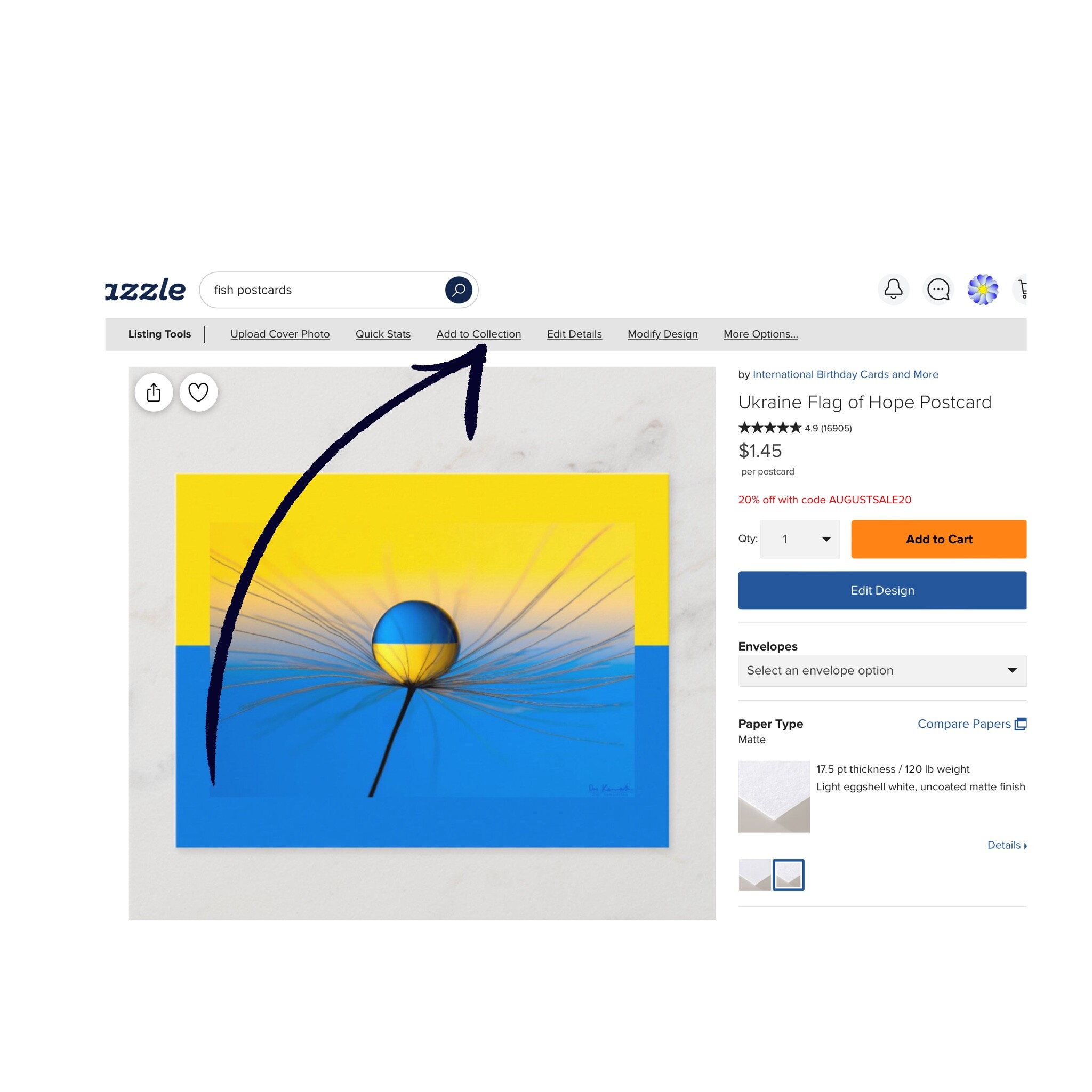
When you open one of your product pages the old blue banner used to be at the top of the page. But now it’s gone and there is a light grey banner with links in it. The Quick Stats link has a drop down list of the stats. And the Edit Details link opens up the details page we would normally see in the management end where we can change the title, tags, store category, royalty etc.
Hope this is helpful.
1 Like
James gave pictures in his post announcing the new tool bar. https://community.zazzle.com/t5/creator-news/management-tool-refresh/ba-p/33912
ok
oh I get it, thanks its under each individual item, I never have used that area funny!  :)
:)
2 Likes
@Antaine It’s above your product photo. Ability to add the products of other designers to a collection has been removed.
2 Likes
Thanks! I wasn’t seeing how to get to the spot that gave me the option.
1 Like
Same here! Once I create a product, I view it and share it or put it in a collection. I used to be able to VIEW PRODUCTS from the Management tool. This has always been there but just took up real estate. I don’t mind the more minimal view, by there is no way to get back to all of my designs without clicking on My Store, click on the store name then products. Having click 3 x instead of 1 is frustrating.
1 Like