Hi Creators,
You might have seen that there is a new experience called Media Manager. Feel free to leave your feedback on this evolution, here.
Thank you.
Hi Creators,
You might have seen that there is a new experience called Media Manager. Feel free to leave your feedback on this evolution, here.
Thank you.
Love the improvement!
A bug: when downloading artwork, the portrait shaped card was square. See also this thread where others noticed the same.
Would also be nice if the artwork could be shaped with transparency for example when the product is rounded. Now it always has square corners.
Thanks so much! I love the ability to add more than one cover photo and captions! These are really nice improvements. My only other comment is that I wish we had the ability to download product images with a transparent background. When I first saw the check box I was thrilled, but then realized it says change transparent to white, not white to transparent. My fingers are still crossed for downloading with a transparent background. Please consider it and thanks for the new changes, great job!
Overall, I think it’s a great update! First use is on an invitation. In the downloads, there are no options for digital photos (like the hand with the phone or the ipad). Can those be included in the downloads - I’d think that would be a great use of multiple cover photos to show off printed vs. digital.
Just going to drop the three other threads on this new feature here in the official one.
Feedback for Media Manager [Official Thread - General Discussion] <– You Are Here
Media Manager [Store Management]
New Media Manager Cover Photos [Ask a Question]
New Cover Media Manager and Download images Option [General Discussion]
I’ve taken my first try at the Media Manager and don’t find it any faster, but if I were to do more than one cover, it might be a little quicker to change the featured mockup.
I put in a caption, but why? Where does it show and how is it useful? It doesn’t show up with the thumbs on the product page, not that I can find anyway.
Please, please, please, stop the Media dropdown from dropping down, staying there, and covering up what we’re doing. Create a little call-out balloon that will alert those who don’t yet know about the new facility. The dropdown has become a penance to go through before carrying on with work.
You can find the caption when people click on the thumbnail to enlarge them, like here:
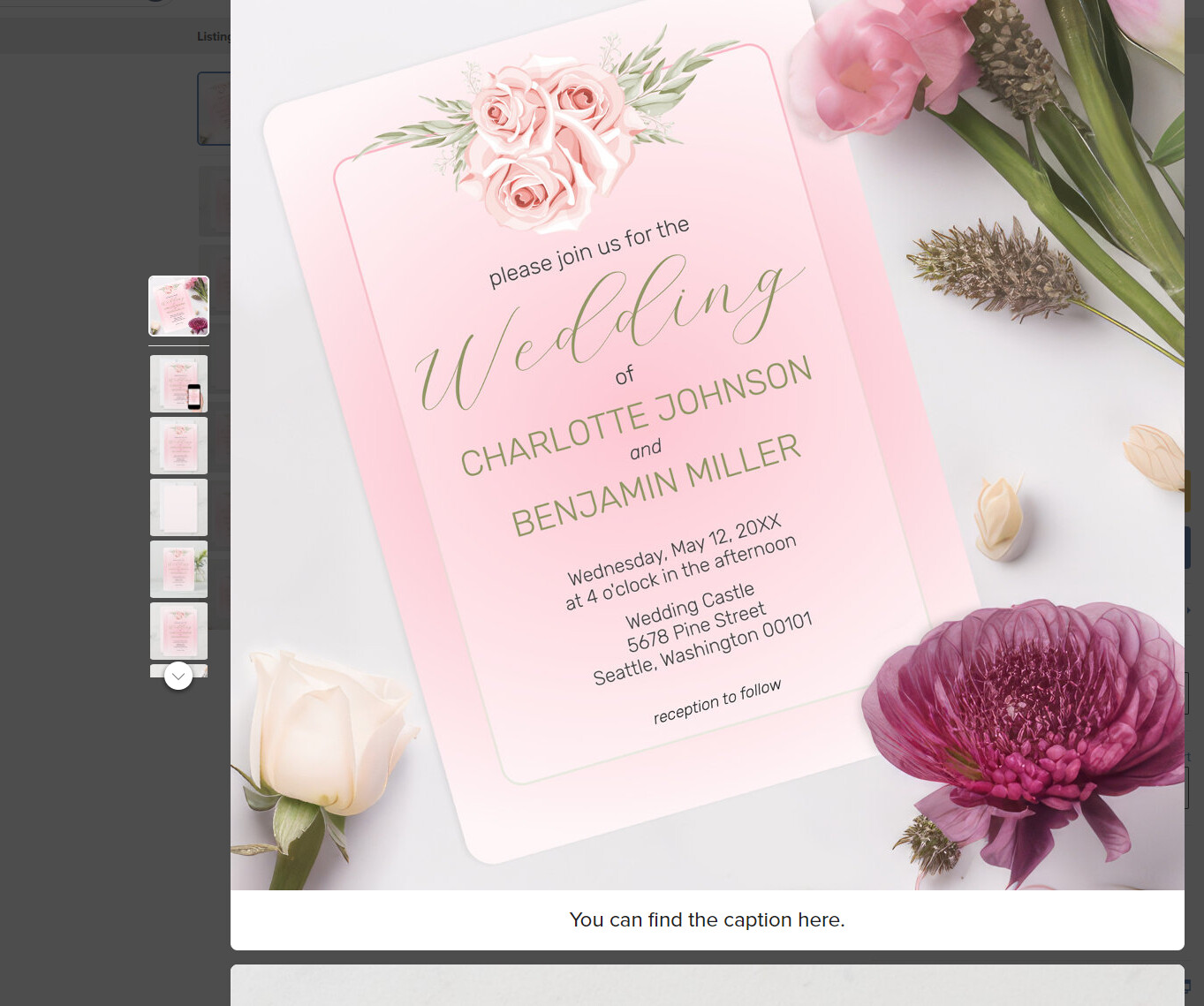
This is on desktop, I couldn’t find the caption on mobile.
A question about best practices: If for example you are adding images for a T-shirt with customizable text - for a t-shirt that says “Oh La La” (as template holder text) should I create illustrations that show different texts to give ideas about different ways to modify the t-shirt, for example by changing it in one image to “Maid of Honor” or whatever? And if the images are SVG, can we also show the images in different colors to let people know they can do that?
Apparently seeing the caption is good on some screens and not on others. My nicely sized high-resolution monitor doesn’t show the caption unless I scroll the enlarged photo, which isn’t something I imagine most customers would think to do. And now that I’ve seen my caption, I’m going to delete it. It’s stupid to say what any fool can see. LOL
“which isn’t something I imagine most customers would think to do”
We have access to this data, and we’ve decided to add this new ability for you to upload media and add a caption.
Thank you for this!!!
But the thumbs are right there to click on. I’m still wondering why people would choose to scroll.
This is all very well with printed matter, but it is supremely hard to make any cover with the few views/layouts/mockup designs we have on some products. This is because there are parts of the product missing,e.g. necklace(only a tiny part of the chain is shown, no clasp), or there is a very limited view,e.g. flat example without creases or folds or being worn(such as the scarf ). We could do a lot more if we had a better starting pint. I ,for one, cannot afford fancy programmes which add these things, I use a free one which is limited as yet, in this regard, and takes a lot of time to create such an effect by hand. This makes me not want to even bother. Very Frustrating. I enjoy creating particular physical(non paper) items, but the covers are harder to create than they should be. BTW, most of my sales lately are still for products that have no cover image frome me yet. 
Excellent addition!!! Only niggle is: I wish the “front” of business cards and notecards / greeting cards was supplied / downloaded without a background. Yes I am capable of removing a background but it just adds more work time at a time when time itself is at a premium… having to work / design products and mockups is an enormous task when many designers have thousands and thousands of designs to work on. That’s not a complaint by any measure… I’m SO grateful to have these tools Z is providing.
Adding: I wish the acrylic name plates were available in the angled position without a background… it would be a huge time saver
Here’s acouple of ideas. Create your own graphic backgrounds. Use the design image with a lowered opacity as a background.
thanks Elisabeth, great idea(my last alphabet items doesn’t work all the time, hence the s in your name!! haha)
Really sad that the artwork I uploaded on a png transparent background gets downloaded with a white background with this media manager. If it worked before when we downloaded artwork on a transparent png - why can’t it work now? Please 🙏
I love the caption idea, because not everyone will read the creator’s description in the normal field, and it’s a chance to point out our ‘point of difference’ from other designs, and to explain more in-depth either the intent of the design, or a story around it’s creation.
How do you remove a cover image? We didnt like the background we first used in MarBeth Business, but haven’t got all of them changed.