Masks turn automatically into frames - An svg. shape used to mask turns after a while into a frame. This alters the image template behavior. Can this be prevented?
I think this is intended now. Zazzle changed it back in September. There’s a post called “Update to Image Templates and Masks for Easier Customization” on Sept. 5, 2025 in the Creator News forum in case it doesn’t keep the link I put to it.
Thank you.
1 Like
All images do unfortunately. It even converts old images. I really wish they wouldn’t do this for single images. Or at least I wish they would make it so that if you had to delete from one side of a double sided thing, it wouldn’t delete all of the images and then still leave the frame. Images never used to do that even when templated. It just seems to have odd behaviors.
1 Like
I totally agree about the thing where it deletes the image and leaves the frame. It makes it really difficult for a customer to remove an image if they don’t want one.
2 Likes
I wholeheartedly agree. It also extends time working on a design.
1 Like
I made this test product on 10/15 with one reason being to see if masks made using personal svgs or regular elements/shapes provided by Z would get converted to Frames. To date, they have not been converted.
I think this may be due to this, from @Claire 's link above:
We’re able to determine if an image template is likely to be replaced by checking if the placeholder image set by the creator has personal content like faces, etc.
5 of my 7 placeholder images were the same dog photo, the other 2 were just patterns.
I think I’ll publish the same test again but with a person-pic as the template images, to see if it then gets picked up for auto-conversion because of faces in it .
1 Like
In my region, we still have the previous design space. After a brief inspection, I realized that the frames did not behave as needed. I missed the conversation around this.
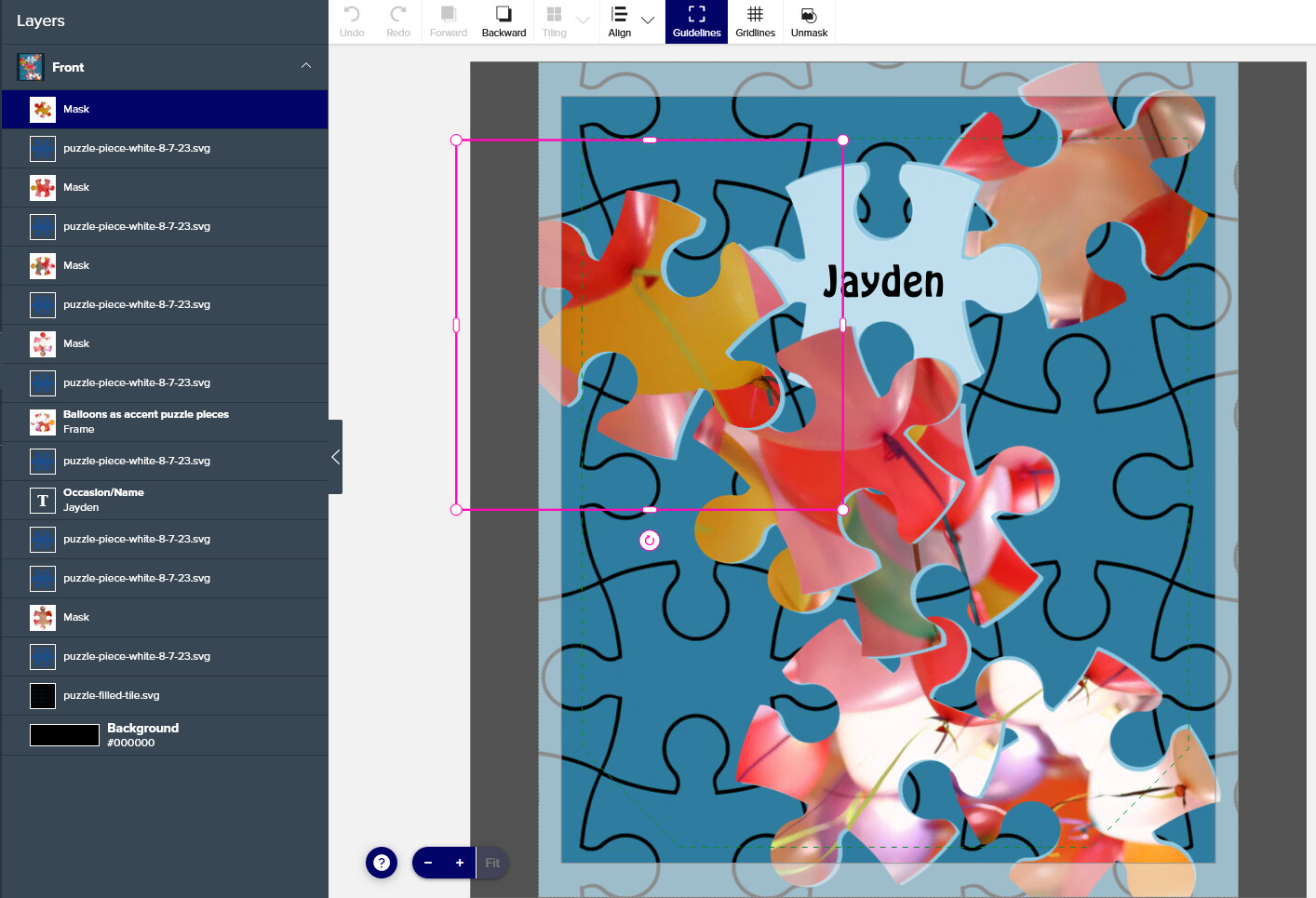
This design was completed on November 2nd, and it did not matter what the image showed. I suppose that, since the same area of the image has been transferred from mask to frame in multiple product designs, the masked area is the deciding factor.
Here is a screenshot. Of the six masks covered by different areas of the same image, one was transferred to a frame, and the rest remained masks.
1 Like
Have you tried looking at the design in a different browser where you are not logged in? We all still have the same/old design tool when logged in. It’s only when you look at other people’s designs that you can see the new version. Or when you are not logged in, then you can look at your own. But not 100% of items have it yet. But for sure you can check on things like invitations, mugs, pillows, etc.
1 Like
No, I did not. And I do not see how it would make a difference to the fact that some masked images transfer to frame and others hold their status as mask.
The point is that the frame interferes with the selected masked image part. It shrinks it (to the size of mask element, centers it) and negates the selected area. Therefore the ongoing image puzzle effect gets lost.
@KBMD3signs I was only referring to you saying you don’t have the new design tool. I wasn’t talking about the frame aspect.
I understand, thank you.
Did you try to disable the template function on the image you wish to delete (if you have it appear in multiple places within the design)?
It seem to keep the rest intact then.
No, because I am not in the habit of it yet, because that was never necessary before with the images. I’m sure I will get used to it with time, but still seems like it should function like the old way… which was not as much of a pain. Especially because I still wanted it to be a template on one side. But even if I wanted it to stay on the front side, and delete the back, it deletes both images, and leaves the frame. Before, you could delete the back and the front would remain untouched.
Agree. It might take some time. And the above seems a possible solution.