Why I am styling my Mockups and Why you might Want to
- Mark as New
- Bookmark
- Subscribe
- Mute
- Subscribe to RSS Feed
- Permalink
- Report Inappropriate Content
08-31-2025 02:05 PM - edited 08-31-2025 02:11 PM
I was scrolling through leggings at marketplace today and discovered that there is a blind spot in the mockup designs and that blind spot is probably costing creators sales. When leggings are shown styled as activewear / fitness the customers may scroll past thinking “I have enough workout gear”
I am not sure why creators don’t show the legging or tank top in different mockups such as a casual shopping at the mall or work at the office look. In my opinion I think showing the mockups styled with different fashion looks would help sell the top or legging. (Attract another customer) not just activewear. Isn’t it better to sell a possibility, with your mockup by showing them “this legging isn’t just activewear”
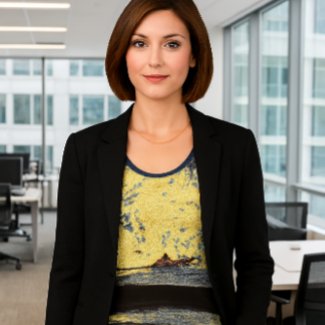
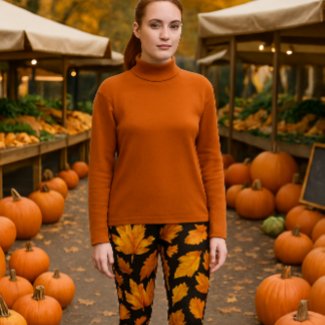
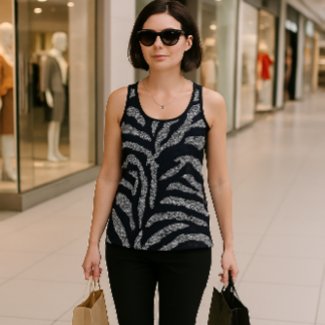
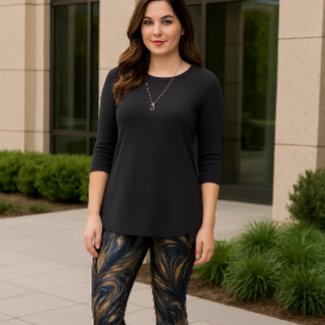
In my opinion I think you might sell more leggings and tank tops if you showed the customer how to put together the casual, business, or date night look. ( I am adding 3 fashion look mockups to products to show customer how to create a unique style)
I want to create a need for a product, I want to sell style, plus active or jean looks.
This is what I am working on… Business look
Seasonal Look
Shopping Look
Dressy Casual look
- « Previous
-
- 1
- 2
- Next »
- Mark as New
- Bookmark
- Subscribe
- Mute
- Subscribe to RSS Feed
- Permalink
- Report Inappropriate Content
11-14-2025 05:07 PM
I have to be honest, maybe just me, but some of the AI (and yes I do use Ai for mockups if I can't find or take my own photo to use) look so fake would put me off purchasing the item. I have found some of my lesser Ai mockups have tanked and turned red already questioning time invested. Granted Ai is much quicker than me using an editing program, or taking my own photo but the results can be mixed... The best covers seem to be the ones that look right and not a quick Ai fix. Just look at the contest winners they are all incredibly done, it is getting very hard this days to keep up with the quality of the covers.
- Mark as New
- Bookmark
- Subscribe
- Mute
- Subscribe to RSS Feed
- Permalink
- Report Inappropriate Content
11-14-2025 06:38 PM - edited 11-14-2025 06:40 PM
I build mockups that move. Whether it’s a child laughing with flour on his face or a dad helping with cookies, the goal is connection. Customers don’t just see an apron. They see Johnny needing that apron so his clothes survive the next baking session. That’s the moment that sells. I don’t use mockups to decorate. I use them to translate need, evoke memory, and anchor the product in a lived experience. That’s why they perform better.
- Mark as New
- Bookmark
- Subscribe
- Mute
- Subscribe to RSS Feed
- Permalink
- Report Inappropriate Content
12-03-2025 06:14 AM
Thanks again for sharing all this, @Susang6
I am playing with the CoPilot and it regularly cracks me up:

(that's the brief it gives on what it's trying to do 🙂
It has a lot of difficulty understanding a mockup needs to be square, it oftentimes reverts to rectangular. And indeed every image needs retouching. Regardless, it does come up with some great ideas at times!

- Mark as New
- Bookmark
- Subscribe
- Mute
- Subscribe to RSS Feed
- Permalink
- Report Inappropriate Content
12-03-2025 09:03 AM - edited 12-03-2025 09:11 AM
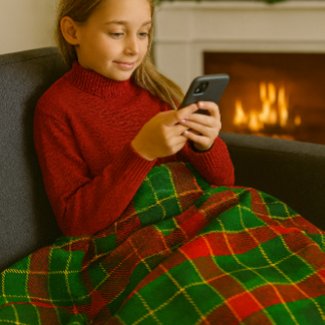
I ask it to do 2500 x 2500 / and I generally resize all of the mockups . Also tell Copilot that its a mockup for Zazzle. Then tell it to research mockup dimensions for zazzle listing. Do you understand what I need. and it will tell you. If it is correct then move forward. I did this mockup yesterday with copilot. I really like the way it turned out. Shows the customer the need for the blanket
- Mark as New
- Bookmark
- Subscribe
- Mute
- Subscribe to RSS Feed
- Permalink
- Report Inappropriate Content
12-08-2025 10:16 PM - edited 12-08-2025 10:22 PM
some AI mockups can look really polished, while others feel a bit “off” and that definitely impacts sales. Honestly, it’s tough to know what’s going wrong without seeing the actual mockups you’re working with. Would you be open to sharing one or two examples here in the discussion?
That way, we can look together at whether it’s a prompt issue, a styling choice, or just the wrong mockup base. Sometimes even small tweaks lighting, background tone, or choosing a different lifestyle setting can make a huge difference
- Mark as New
- Bookmark
- Subscribe
- Mute
- Subscribe to RSS Feed
- Permalink
- Report Inappropriate Content
12-04-2025 08:49 AM - edited 12-04-2025 08:52 AM
Thanks, @Susang6
I really like your tartan mockup!
The thing really has a stubborn mind. I told it the exact dimension, but I can't get it bigger than 1024.
At least half the time it simply doesn't follow the instructions. I find it helps if I can find an example image of the style I am after. And it also has a tendency to alter the design provided (sometime really hilarious), so if at least somewhat acceptable, it mostly needs some (or more) afterwork. So some frustration, but also some really good results. And cracking me up a lot! Thanks for your help with this!
- Mark as New
- Bookmark
- Subscribe
- Mute
- Subscribe to RSS Feed
- Permalink
- Report Inappropriate Content
12-04-2025 03:00 PM - edited 12-04-2025 03:03 PM
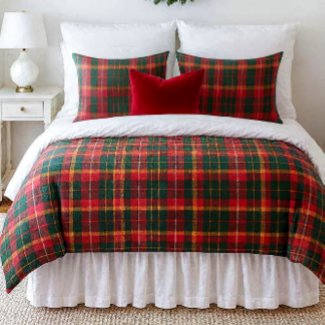
I’ve been working on a series of magazine-style duvet covers, and in creating them I tend to be very wordy with my instructions on purpose. I’ve found that AI excels in magazine-style mockups when I guide it with styling and detailed visual prompts.
This tartan bedroom scene is a great example. We actually collaborated on it there were a couple of edits where I asked, “What do you think?” That moment helped the AI look at the image more intuitively and see what I saw, which allowed us to modify the scene together. So yes, I collaborate with AI. I don’t treat it as a tool I treat it as a creative partner. It doesn’t always follow instructions literally, but when I give it both technical and stylistic clarity, it responds with surprising depth. I also move past the size issue (like the 1024 limit) by resizing afterward. For me, the priority is getting the narrative design through visual presentation right then I handle the technical image size myself. (resizing)
Your point about using example images is excellent. Copilot responds much better when it has a visual reference for the style, you’re after. And yes, sometimes the “interpretations” are hilarious, but they’re also raw material we can refine into something usable.
Thanks again for adding your perspective it’s exactly the kind of insight that helps others learn how to balance Copilot’s strengths with practical afterwork.
Here is tartan mockup I mentioned:
- Mark as New
- Bookmark
- Subscribe
- Mute
- Subscribe to RSS Feed
- Permalink
- Report Inappropriate Content
12-08-2025 12:23 AM
I use copilot, because you recommend it. It is working fine, the less you put in the prompt, the better it comes out. But it is more surprising. I usually dont like the teeth and eyes of people. Thank you
- Mark as New
- Bookmark
- Subscribe
- Mute
- Subscribe to RSS Feed
- Permalink
- Report Inappropriate Content
12-08-2025 01:17 AM
This kind of prompt solves the “scary teeth and eyes” problem because it tells the AI exactly what to do instead of leaving it to improvise. By asking for “a natural‑looking model with a relaxed, pleasant expression, soft eyes, and a gentle smile (no exaggerated teeth), professional studio lighting, and fashion catalog style” you’re guiding the model toward realism.
The key is that the language anchors the AI in photography cues (studio lighting, catalog style, clean proportions) rather than vague “make a person” instructions. That’s why the output looks more like a polished mockup and less like a distorted face. It’s not about writing less it’s about writing the right details so the AI knows to generate natural expressions and keep the focus on the product.
- Mark as New
- Bookmark
- Subscribe
- Mute
- Subscribe to RSS Feed
- Permalink
- Report Inappropriate Content
12-06-2025 04:07 PM - edited 12-06-2025 04:19 PM
I wasted 3 hours with 4 different mockup websites trying to get "their AI" to replicate a tartan pillow and blanket mockup, the blanket would be right the pillow would be wrong. I at one point created an HTML to teach copilot to do mockups according to the exact product image. It should have worked it didn't only to find out that Canva is the only AI that can replicate tartans perfectly each and every time. It definitely is a learning curve. I was totally exasperated because I pay for the advanced copilot that is supposed to do mockups / and be for artists and bloggers...guess not. Its safe to say its "hit or miss" I learned "the hard way" > Canva’s AI is set up more like a design studio, so it’s great at dropping patterns like tartan plaid straight onto mugs, shirts, or posters because it has those product mockup templates built in. Copilot’s AI is more of a general creative tool it can make plaid patterns or illustrations, but it doesn’t have the same “apply to product” feature that Canva does. Basically, Canva is geared toward merchandising workflows, while Copilot is more about broad creativity and knowledge. @mylittleeden @PAZP (tagged you thought you would interested)
- Mark as New
- Bookmark
- Subscribe
- Mute
- Subscribe to RSS Feed
- Permalink
- Report Inappropriate Content
12-06-2025 04:29 PM
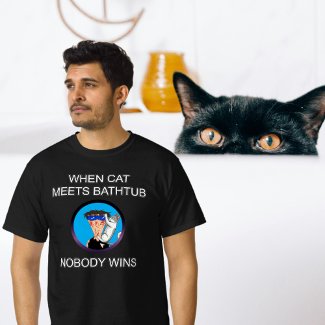
ai in general is hit or miss--in my experiences it's mostly miss. For the shirt below, I had to create and edit elements separately then assemble them in photoshop because the site i use just couldn't figure it out all at once.
 |  |  | Follow and I'll follow back |  | 10% off Facy.ai |
- Mark as New
- Bookmark
- Subscribe
- Mute
- Subscribe to RSS Feed
- Permalink
- Report Inappropriate Content
12-08-2025 01:09 AM
There’s no need to piece it together in Photoshop you just have to write the right prompt. Try something like: “Create a mockup of a man wearing this uploaded T-shirt, He has a frustrated expression. In the background, there’s a white bathtub with a black cat peeking over the edge.”
That gives the AI everything it needs: subject, outfit, emotion, and background. If the shirt design is uploaded in high resolution, the model has a much better chance of placing it accurately without warping or improvising. You’re not asking it to invent elements you’re asking it to assemble a cohesive scene using your actual design. That’s the difference
- Mark as New
- Bookmark
- Subscribe
- Mute
- Subscribe to RSS Feed
- Permalink
- Report Inappropriate Content
12-08-2025 11:54 AM
it's the shirt design itself that was made w/ ai. i started with my avatar and needed the middle finger removed and cat moved and reconfigured, shirt torn up, hair wet, face scratched etc. i had to remove the cat entirely because the ai couldn't get it right; it just kept placing the cat on his shoulder.
I saved that image of just the guy without the finger and cat and re-upload it as my starting point. i added the torn shirt and scratches, but it still couldn't get the cat right, so i had to create a new image of a cat clinging to a scratching post, but it couldn't get the ears right. i had to download the image of the cat on the scratching post, then re-upload it as a starting point to get the ears to point back and remove the scratching post. then i added the cat to the guy in photoshop.
once the image was done, i uploaded the design to zazzle, used ai again to remove the background of the mockup and replaced the background with a non-attributable public domain image of a cat peaking over the tub.😐
| | | Follow and I'll follow back | | 10% off Facy.ai |
- Mark as New
- Bookmark
- Subscribe
- Mute
- Subscribe to RSS Feed
- Permalink
- Report Inappropriate Content
12-08-2025 12:20 PM - edited 12-08-2025 12:32 PM
"it's the shirt design itself that was made w/ ai. i started with my avatar and needed the middle finger removed and cat moved and reconfigured, shirt torn up, hair wet, face scratched etc. i had to remove the cat entirely because the ai couldn't get it right; it just kept placing the cat on his shoulder. I saved that image of just the guy without the finger and cat and re-upload it as my starting point. i added the torn shirt and scratches, but it still couldn't get the cat right, so i had to create a new image of a cat clinging to a scratching post, but it couldn't get the ears right. i had to download the image of the cat on the scratching post, then re-upload it as a starting point to get the ears to point back and remove the scratching post. then i added the cat to the guy in photoshop."
Yes, I’ve learned this the hard way if you create the image in AI, upload it to a product, then try to change the design of the product in the mockup, the design modification (artwork) makes it fall apart. Every re‑upload makes the AI reinvent the shirt instead of just placing the final design, and any modifications throw it off. Lock the finished file first, then only prompt for the scene. AI can be a frustrating "hit or miss"
Re‑uploads with modifications confuse the model, because it redraws instead of applying.
- Mark as New
- Bookmark
- Subscribe
- Mute
- Subscribe to RSS Feed
- Permalink
- Report Inappropriate Content
12-07-2025 04:03 AM
@Susang6 "I wasted 3 hours with 4 different mockup websites"
I'm getting there 🙂
I officially ruled out using Adobe Firefly and Canva for being useless today.
- Mark as New
- Bookmark
- Subscribe
- Mute
- Subscribe to RSS Feed
- Permalink
- Report Inappropriate Content
12-07-2025 03:57 PM
Today I was told midjourney offered prompt created mockups, but there is not free trail. Have you tried their AI. I don't like the websites that have achieve of templates and you just add your image, those mockups are not original ...and you tend to look like everyone else.
- Mark as New
- Bookmark
- Subscribe
- Mute
- Subscribe to RSS Feed
- Permalink
- Report Inappropriate Content
12-08-2025 12:34 AM
The last time I checked out Midjourney they were very expensive (I don't have a budget for things like this on the new "ambassador" program). Also they were meowing a lot about copyright issues. So far the CoPilot comes out most workable, though far from perfect. It is also the most funny. And Gemini, if you can stick to doing just one cover a day.
- Mark as New
- Bookmark
- Subscribe
- Mute
- Subscribe to RSS Feed
- Permalink
- Report Inappropriate Content
12-08-2025 12:47 AM - edited 12-08-2025 12:58 AM
I like Gemini and looked at the pro version its $19 a month...that adds up quickly and my earnings are less than half of what I used to earn before the fees at Zazzle...so I have to do free AI. Have you checked out Bing AI..its free and they have DALL-E3 image creator
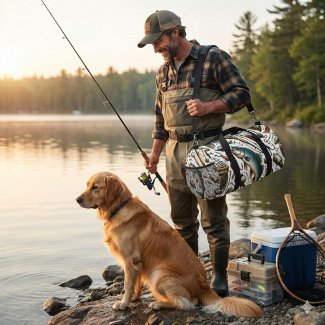
I created this lifestyle mockup with Gemini tonight...I needed to promote gifts for men and had this duffel bag, it did not say "buy me" or " my Dad needs that bag" so I did this mockup
- Mark as New
- Bookmark
- Subscribe
- Mute
- Subscribe to RSS Feed
- Permalink
- Report Inappropriate Content
12-08-2025 04:53 AM - edited 12-08-2025 04:55 AM
That's a really nice bag mockup, @Susang6
Thanks for suggesting Bing AI. I just tried it, but can't find a way to really interact with it, like with CoPilot. And it didn't use the images I provided half the time.
The MAI generator seems to be working better, in the sense of creating a compelling image, but did not use my example (bandana):

It runs out of resources quickly apparently.
This is GPT 4:

I find the above image better, but that's just my taste.
And now I get: prompt blocked. Sweet 🙂
- Mark as New
- Bookmark
- Subscribe
- Mute
- Subscribe to RSS Feed
- Permalink
- Report Inappropriate Content
12-08-2025 12:30 PM - edited 12-08-2025 12:47 PM
The are both magazine quality scarf model mockups...beautiful and unique to you not like everyone else . Customers can see the need...to buy ...now to get your image design and not AI's try this prompt > The prompt has to tell the AI to apply your uploaded bandana exactly as the product, not improvise. Try: “Use the uploaded bandana design exactly, styled around a female model’s neck with the knot tied to the front.” That way it knows the file is the design layer and the scene is just placement.
I like this prompt also > “Use the uploaded scarf design exactly as the product. Show it styled on a female model, wrapped around her neck with the knot tied to the front. Background is [choose lifestyle setting: e.g., cozy living room, city street, fashion studio]. Do not alter the scarf’s colors or pattern.”
- Mark as New
- Bookmark
- Subscribe
- Mute
- Subscribe to RSS Feed
- Permalink
- Report Inappropriate Content
12-08-2025 01:28 PM
I just did this mockup for a scarf on copilot using this prompt >
“Use the uploaded scarf design exactly as the product. "Show the scarf styled on a female model, wrapped around her neck draped softly. Background is lifestyle setting with botanical garden Do not alter the scarf’s colors or pattern. clarity high resolution, bright light realism"

- Mark as New
- Bookmark
- Subscribe
- Mute
- Subscribe to RSS Feed
- Permalink
- Report Inappropriate Content
12-08-2025 01:35 PM - edited 12-08-2025 01:37 PM
Why did you get blocked? I got blocked the other day when I asked AI to create a lifestyle mockup of a girl sitting in a chair with floral fleece blanket covering her lap and legs legs. The chair was next to a window where you could see the snow falling, she had her earbuds in and phone in her hand..and it was flagged due to the blanket on her lap covering her legs. it fell under child safety issues. I thought ?????? what is AI thinking
- Mark as New
- Bookmark
- Subscribe
- Mute
- Subscribe to RSS Feed
- Permalink
- Report Inappropriate Content
12-08-2025 05:18 PM
so much for A, now they have to work on I...
| | | Follow and I'll follow back | | 10% off Facy.ai |
- Mark as New
- Bookmark
- Subscribe
- Mute
- Subscribe to RSS Feed
- Permalink
- Report Inappropriate Content
12-09-2025 12:54 AM - edited 12-09-2025 12:55 AM
@Susang6 LOL. I don't know if AI is thinking. It later said I had violated content policies. I used the exact same prompt as earlier (without problem) and added something like have the scarf knotted and the woman look a bit sideways. The child safety filters are clearly not working as they should. Or is a "knot" inciting violence?
Love your scarf by the way!
- Mark as New
- Bookmark
- Subscribe
- Mute
- Subscribe to RSS Feed
- Permalink
- Report Inappropriate Content
12-09-2025 10:13 AM
must have been the knot...of the scarf around the neck...inciting violence...has to be a keyword triggering the flag . I wonder if there is a master list of keywords somewhere.
- Mark as New
- Bookmark
- Subscribe
- Mute
- Subscribe to RSS Feed
- Permalink
- Report Inappropriate Content
12-12-2025 12:16 AM
Hmmm I use the free version of Gemini and don't appear to have a limit. I am in the UK so no idea if that has an impact.
- Mark as New
- Bookmark
- Subscribe
- Mute
- Subscribe to RSS Feed
- Permalink
- Report Inappropriate Content
12-12-2025 12:57 AM
I am cut off today at 10 and they are pushing me to go pro.
- Mark as New
- Bookmark
- Subscribe
- Mute
- Subscribe to RSS Feed
- Permalink
- Report Inappropriate Content
12-09-2025 10:11 AM
I checked out canva...and was not comfortable with the setup...saw that they have a lot of templates that allow you to add your products and after creating my own prompts and my own unique lifestyle mockups I am not a fan of just add your product and we will do the background. It's just not unique . Canva does offer a lot ...especially the videos. Have not checked out firefly.
- Mark as New
- Bookmark
- Subscribe
- Mute
- Subscribe to RSS Feed
- Permalink
- Report Inappropriate Content
12-12-2025 12:14 AM
Interesting with regards to Canva. There are many options on Canva for Ai. I find canva good for many things but not AI lifestyle images. Perhaps I am using the wrong prompts. I shall have to investigate. I find Gemini works best for me.
I have Canva pro so I'll keep trying.😁
- Mark as New
- Bookmark
- Subscribe
- Mute
- Subscribe to RSS Feed
- Permalink
- Report Inappropriate Content
12-12-2025 05:08 AM
I probably could have figured it out, but it gave me a headache...too much going on there...I had a head injury a few years ago...and certain websites like that with a lot going on give me headaches...so I prefer simple AI where I write my own prompts. Hey Martin if you ever need help with a prompt , or want to try something new, I can help you.
- Mark as New
- Bookmark
- Subscribe
- Mute
- Subscribe to RSS Feed
- Permalink
- Report Inappropriate Content
12-12-2025 05:10 AM
Thank you @Susang6 😊
- Mark as New
- Bookmark
- Subscribe
- Mute
- Subscribe to RSS Feed
- Permalink
- Report Inappropriate Content
12-10-2025 12:15 PM - edited 12-10-2025 12:18 PM
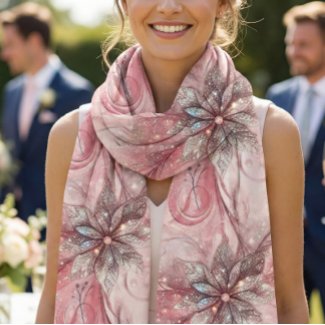
Copilot was update on 12/9 mockups are terrible...the update emphasized on writing, products listings SEO keywords, search ...Like you can ask it what's trending today in POD and it will do a wide search and tell you what people are shopping for, You can ask it what are trendy spring colors for fashion, or if cottagecore is still trend, (copilot loves cottagecore) But mockups, nope having a really problem. I decided to use Gemini (limit of 4) and Bing Dall-E3 for now...I did this mockup for spring weddings...and really like how the lifestyle mockup turned out. Going to blog about it and send organic links back to the chiffon scarf.
- Mark as New
- Bookmark
- Subscribe
- Mute
- Subscribe to RSS Feed
- Permalink
- Report Inappropriate Content
12-12-2025 04:18 AM
Stunning!
- Mark as New
- Bookmark
- Subscribe
- Mute
- Subscribe to RSS Feed
- Permalink
- Report Inappropriate Content
12-11-2025 02:31 PM - edited 12-11-2025 02:36 PM
Sharing a lifestyle mockup that demonstrates proportion accuracy, surface integration, and environment alignment. For fleece blankets, specifying exact dimensions is essential because the AI does not interpret terms like ‘medium.’ Using precise measurements helps maintain correct scale relative to furniture and surrounding elements.
This mockup works because the blanket is shown in a natural drape, which communicates how the fabric behaves. The chair, window light, and tabletop elements provide clear scale references, making the 60x80 size easy to visualize. The setup also demonstrates a practical use‑case context, showing how a fleece blanket functions in a typical home environment and how it adds warmth on cooler days. These factors support customer decision‑making and strengthen overall merchandising effectiveness.

- Mark as New
- Bookmark
- Subscribe
- Mute
- Subscribe to RSS Feed
- Permalink
- Report Inappropriate Content
01-26-2026 01:37 AM
I used Copilot to help style my nursery mockup and wow, did it bring my wallpaper to life! The floral print I created is joyful, fresh, and full of personality. With coral, teal, and sunny yellow dancing across a white background, it feels both playful and elevated like something straight out of a high-end nursery catalog. It anchors the whole room and gives it that “I want to live here” vibe. Copilot helped me nail the balance between cheerful and chic. So proud of this one. And if the mockup looks familiar...well its offered by Zazzle as one of the view options, its all white.at zazzle..not this one!


- « Previous
-
- 1
- 2
- Next »
