- Mark as New
- Bookmark
- Subscribe
- Mute
- Subscribe to RSS Feed
- Permalink
- Report Inappropriate Content
04-03-2026 04:58 AM
Help! The horizontal green dash lines show the bleed lines for the top and bottom of the mug BUT the vertical ones at each end of the mug are missing. They did exist in the old editor. Can we now design right up to each end? Is there any information on this? Thanks for taking the time to help. Sue

Solved! Go to Solution.
- Mark as New
- Bookmark
- Subscribe
- Mute
- Subscribe to RSS Feed
- Permalink
- Report Inappropriate Content
04-14-2026 01:49 PM
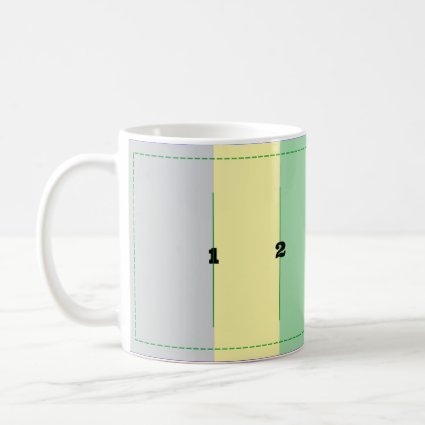
The green safe lines are still there, they are just directly under the grid lines you have toggled on.

Here's a mug I made as a guide a while back that may be helpful.
 |  |  |  |  |  |  |  |  |  |
- Mark as New
- Bookmark
- Subscribe
- Mute
- Subscribe to RSS Feed
- Permalink
- Report Inappropriate Content
04-14-2026 07:07 AM
@Mark No one has been able to answer this for me. Can you? Thanks, Sue
- Mark as New
- Bookmark
- Subscribe
- Mute
- Subscribe to RSS Feed
- Permalink
- Report Inappropriate Content
04-14-2026 12:28 PM
I just tried a mug with an isolated object (cat doll). I had the pink nose right up to the edge of design space and it showed on the view. When the nose inched over the right edge, it was cut off. So, it seems that we CAN possibly design to the right and left edges.
- Mark as New
- Bookmark
- Subscribe
- Mute
- Subscribe to RSS Feed
- Permalink
- Report Inappropriate Content
04-16-2026 02:36 AM
Thanks for replying. Just a cautionary note that designing into the bleed lines can show in the mock up but not on the printed product. My personal preference is to always keep within them.
- Mark as New
- Bookmark
- Subscribe
- Mute
- Subscribe to RSS Feed
- Permalink
- Report Inappropriate Content
04-14-2026 01:49 PM
The green safe lines are still there, they are just directly under the grid lines you have toggled on.
Here's a mug I made as a guide a while back that may be helpful.
| | | | | | | | | |
- Mark as New
- Bookmark
- Subscribe
- Mute
- Subscribe to RSS Feed
- Permalink
- Report Inappropriate Content
04-16-2026 02:34 AM
Thanks so much 🤦🏻♀️ Sometimes you just can’t see the obvious!

